 Firefox
 1 / 9
1 / 9About Southville Font
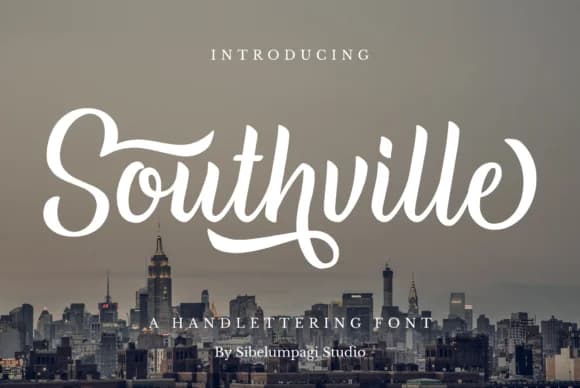
Southville Font by Sibelumpagi Studio is a hand-lettered script with flowing, confident strokes and distinctive swashes that feel genuinely hand-drawn. It brings real movement and personality to any design where you need authentic character rather than mechanical polish. The letterforms are organic and legible despite their decorative nature, which is why it works as both a headline font and something with staying power.
This script excels for wedding invitation suites where couples want that carefully crafted, personal feel. Use it for boutique skincare or artisan food packaging where authenticity genuinely matters to your audience. The swashes work beautifully in custom monogram designs and signature-style applications. Brand identity work for small studios and creative practices benefits from this hand-drawn warmth, and it performs equally well on restaurant menus and greeting card designs that need a more intentional voice. The strong letterforms mean it reads well even when you're scaling it down.
The real value is the balance between ornamental flair and actual usability. You can scale it large for headlines and logos without losing its careful character. All the flourishes read as intentional rather than decorative for decoration's sake. When you're ready to bring this handcrafted quality to your projects, grab Southville from Creative Fabrica.
Style & Use Cases
- Overall Style
- Elegant, Flowing, Southville
- Use Case
- Invitations, Branding
- Ideal For
- wedding stationery, greeting cards, and signatures
- Pairs With
- a simple uppercase sans
How to Install Southville Font Font
Step-by-step instructions for every platform
- 1Download the Southville Font font file (.ttf or .otf).
- 2Locate the downloaded file in your Downloads folder.
- 3Right-click the font file.
- 4Select "Install" to install for the current user, or "Install for all users" to make it available system-wide.
- 5Southville Font is now available in Word, Photoshop, Illustrator, and all other apps.
More by Sibelumpagi Studio
View all →


Browse fonts by theme
Curated collections →Saw a font in a picture? Identify any font from an image with our free Font Finder.
More Script Handwritten Fonts
Browse all →







What pairs well with Southville Font?
Southville Font is a script font that shines as a display or heading face. Pair it with a clean sans-serif or serif font for body text — the contrast creates a clear hierarchy while the two styles stay balanced and easy to read.



Southville Font
Reviewed by the FontBoxDL team · Updated May 2026