 Firefox
 1 / 8
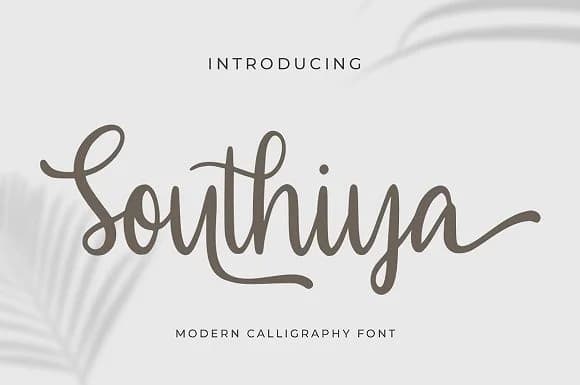
1 / 8About Southiya Font
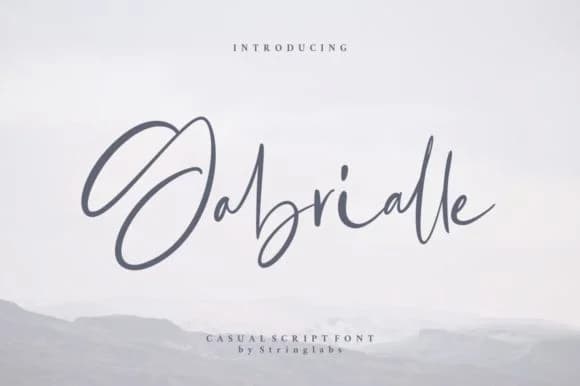
There's an ease and warmth to this script that feels both refined and genuinely human. Southiya, created by StringLabs, channels authentic handwriting without the stiffness that often traps formal scripts. The letterforms carry real personality, the kind that speaks to someone's actual handwriting rather than a designer's interpretation of what handwriting should be.
This font shines on wedding invitation suites where subtle sophistication matters more than flash. You'll find it working equally well on artisan product labels (think boutique skincare, craft chocolates, or small-batch candles), personalized business cards for service providers who want to stand out, and custom greeting cards that need to feel like genuine connection rather than mass production. The readable letterforms hold their ground even in longer passages, making it a natural choice for invitation programs or personalized stationery projects where text extends beyond a few words.
Pair Southiya with a clean geometric typeface when you need both display and body text in a single layout. The contrast between its flowing personality and minimal letterforms creates a balanced layout that doesn't sacrifice warmth or sophistication. Find it on Creative Fabrica and add a beautiful script to your collection that genuinely earns its place in real client work.
Style & Use Cases
- Overall Style
- Elegant, Flowing, Southiya
- Use Case
- Invitations, Branding
- Ideal For
- wedding stationery, greeting cards, and signatures
- Pairs With
- a simple uppercase sans
How to Install Southiya Font Font
Step-by-step instructions for every platform
- 1Download the Southiya Font font file (.ttf or .otf).
- 2Locate the downloaded file in your Downloads folder.
- 3Right-click the font file.
- 4Select "Install" to install for the current user, or "Install for all users" to make it available system-wide.
- 5Southiya Font is now available in Word, Photoshop, Illustrator, and all other apps.
More by StringLabs
View all →
Browse fonts by theme
Curated collections →Saw a font in a picture? Identify any font from an image with our free Font Finder.
More Script Handwritten Fonts
Browse all →







What pairs well with Southiya Font?
Southiya Font is a script font that shines as a display or heading face. Pair it with a clean sans-serif or serif font for body text — the contrast creates a clear hierarchy while the two styles stay balanced and easy to read.



Southiya Font
by StringLabs
Reviewed by the FontBoxDL team · Updated August 2026