 Firefox
 1 / 5
1 / 5About Sontiro Font
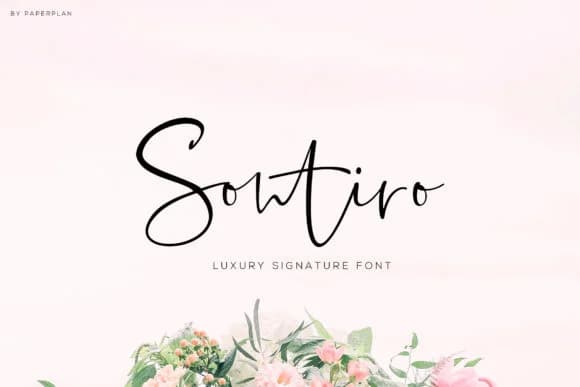
Sontiro, designed by Nest Studio, features fluid letterforms that genuinely capture the organic quality of handwriting done with intention and care. The smooth, hand-drawn texture gives this signature script a personal touch while maintaining the refinement needed for both digital and print applications. Every stroke feels considered, never hurried, which is what separates this from purely mechanical scripts that feel cold and impersonal.
This script excels at lending authenticity to wedding invitation suites, where its flowing curves add genuine elegance without feeling stiff or overwrought. It performs beautifully across embroidery digitization, screen printing projects, and gold foil stamped applications, making it flexible across different production methods and materials. Boutique skincare packaging, custom stationery sets, and product labels for independent businesses all benefit from the typeface's refined personality and readable letterforms. The font also shines on event programs, printed menus, and DIY craft projects that need a touch of handwritten charm without sacrificing legibility at smaller sizes. Paired with clean sans serifs or used alone, it brings personality to any project calling for a human touch.
Sontiro suits designers and makers seeking a script that reads as genuinely handwritten rather than computer-generated, where authenticity matters more than perfection. Get it on Creative Fabrica.
Style & Use Cases
- Overall Style
- Elegant, Flowing, Sontiro
- Use Case
- Invitations, Branding
- Ideal For
- wedding stationery, greeting cards, and signatures
- Pairs With
- a simple uppercase sans
How to Install Sontiro Font Font
Step-by-step instructions for every platform
- 1Download the Sontiro Font font file (.ttf or .otf).
- 2Locate the downloaded file in your Downloads folder.
- 3Right-click the font file.
- 4Select "Install" to install for the current user, or "Install for all users" to make it available system-wide.
- 5Sontiro Font is now available in Word, Photoshop, Illustrator, and all other apps.
More by Nest Studio
View all →


Browse fonts by theme
Curated collections →Saw a font in a picture? Identify any font from an image with our free Font Finder.
More Script Handwritten Fonts
Browse all →







What pairs well with Sontiro Font?
Sontiro Font is a script font that shines as a display or heading face. Pair it with a clean sans-serif or serif font for body text — the contrast creates a clear hierarchy while the two styles stay balanced and easy to read.



Sontiro Font
by Nest Studio
Reviewed by the FontBoxDL team · Updated June 2026