 Firefox
 1 / 8
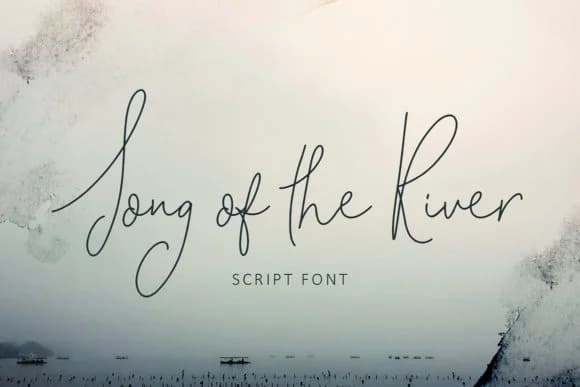
1 / 8About Song of the River Font
Song of the River, designed by Creativeqube Design, captures the natural rhythm of handwriting with organic letterforms that flow across the page. The script's loose, unbounded strokes deliver an authentic quality without feeling stiff or overly formal. Each character moves fluidly, as if written by a skilled hand rather than locked in a rigid grid.
This handwritten script excels at creating wedding invitation suites where personality and warmth matter most. Event menu cards benefit from its sophisticated, personal touch, while custom greeting card designs gain an immediate human quality. Product packaging for artisanal goods and small brands comes alive with this typeface, and branded stationery headers use it to establish trust and craft. The font includes Bold and Italic variants, allowing you to emphasize key words or create visual hierarchy without leaving the script family. Legibility remains strong even at smaller sizes, making it suitable for social media graphics and blog typography where readability counts.
Designers building personal branding projects and print collateral find this script invaluable. It bridges the considerable gap between decorative flair and genuine functionality without sacrificing either. Access Song of the River on Creative Fabrica to get the complete typeface family and begin incorporating handwritten warmth into your work.
Style & Use Cases
- Overall Style
- Elegant, Flowing, Song Of The River
- Use Case
- Invitations, Branding
- Ideal For
- wedding stationery, greeting cards, and signatures
- Pairs With
- a simple uppercase sans
How to Install Song of the River Font Font
Step-by-step instructions for every platform
- 1Download the Song of the River Font font file (.ttf or .otf).
- 2Locate the downloaded file in your Downloads folder.
- 3Right-click the font file.
- 4Select "Install" to install for the current user, or "Install for all users" to make it available system-wide.
- 5Song of the River Font is now available in Word, Photoshop, Illustrator, and all other apps.
More by Creativeqube Design
View all →
Browse fonts by theme
Curated collections →Saw a font in a picture? Identify any font from an image with our free Font Finder.
More Script Handwritten Fonts
Browse all →







What pairs well with Song of the River Font?
Song of the River Font is a script font that shines as a display or heading face. Pair it with a clean sans-serif or serif font for body text — the contrast creates a clear hierarchy while the two styles stay balanced and easy to read.



Song of the River Font
Reviewed by the FontBoxDL team · Updated June 2026