 Firefox
 1 / 7
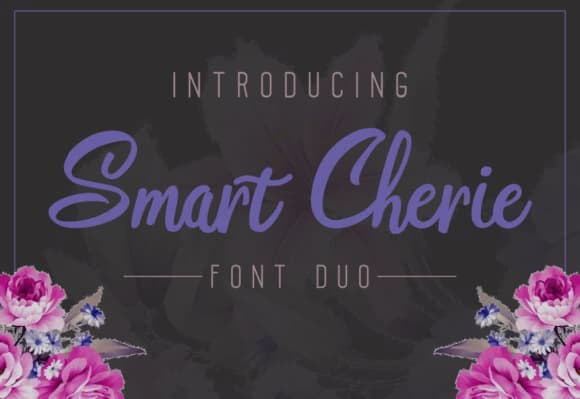
1 / 7About Smart Cherie Duo Font
Smart Cherie Duo by pandanwangi is a handwritten script that packages two distinct but coordinated fonts in one download. The pairing gives you both a flowing primary style and a complementary companion weight, eliminating the frustration of hunting for a second typeface that actually harmonizes with your first choice. You can handle display text, body copy, and accent elements all from the same design file.
Hand-drawn letterforms make these fonts especially valuable for projects where authenticity and warmth matter most. Wedding invitation suites gain real elegance from the organic, delicate strokes. Artisan product labels on boutique skincare or handmade soaps convey that handcrafted credibility that machine-rendered fonts simply can't match. Independent brand identities, greeting card designs, and small-run event stationery all benefit from this genuine handwriting quality that feels personal rather than corporate.
Beyond aesthetics, the dual-font structure solves a practical design problem: having a display script paired with its coordinating weight lets you create true visual hierarchy and contrast without reinventing the wheel. Layer the fonts at different sizes, adjust spacing, and use weight shifts to guide readers naturally through your design. If you're creating work that needs both warmth and sophistication in a single unified voice, add Smart Cherie Duo to your Creative Fabrica library.
Style & Use Cases
- Overall Style
- Elegant, Flowing, Smart Cherie
- Use Case
- Invitations, Branding
- Ideal For
- wedding stationery, greeting cards, and signatures
- Pairs With
- a simple uppercase sans
How to Install Smart Cherie Duo Font Font
Step-by-step instructions for every platform
- 1Download the Smart Cherie Duo Font font file (.ttf or .otf).
- 2Locate the downloaded file in your Downloads folder.
- 3Right-click the font file.
- 4Select "Install" to install for the current user, or "Install for all users" to make it available system-wide.
- 5Smart Cherie Duo Font is now available in Word, Photoshop, Illustrator, and all other apps.
More by pandanwangi
View all →

Browse fonts by theme
Curated collections →Saw a font in a picture? Identify any font from an image with our free Font Finder.
More Script Handwritten Fonts
Browse all →







What pairs well with Smart Cherie Duo Font?
Smart Cherie Duo Font is a script font that shines as a display or heading face. Pair it with a clean sans-serif or serif font for body text — the contrast creates a clear hierarchy while the two styles stay balanced and easy to read.



Smart Cherie Duo Font
by pandanwangi
Reviewed by the FontBoxDL team · Updated June 2026