
 1 / 7
1 / 7About SJURecord Font
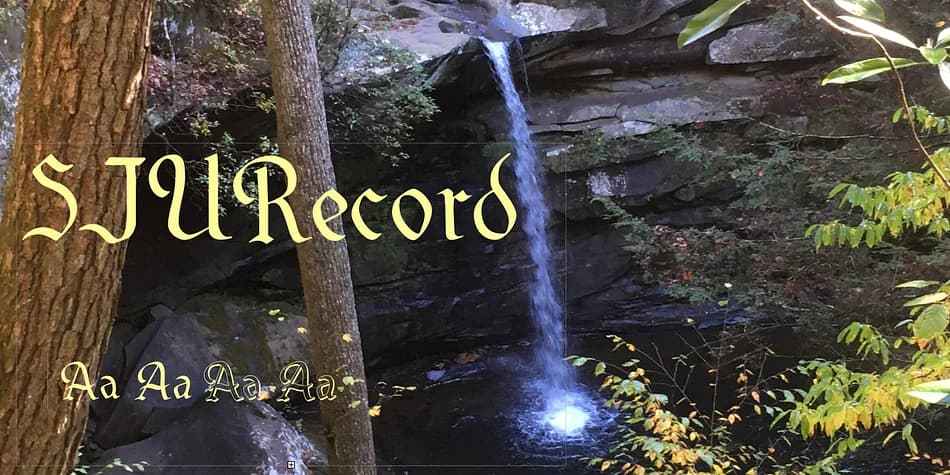
SJURecord by Ingrimayne Type draws from the gothic calligraphy that graced a university newspaper masthead in the 1920s and 1930s. What started as a handful of distinctive letterforms has become a complete typeface family with surprising versatility for both digital and print work. The original inspiration came from studying the interplay between formal calligraphic strokes and journalistic tradition, and that tension gives the font its character and legibility.
Four styles comprise the family: a clean regular weight, an oblique variant, a shadowed version for dimensional effects, and an oblique-shadowed combination. Seven letters come with alternates (A, J, L, S, V, W, X), which means you can swap in different treatments for a more custom, hand-drawn feel. This flexibility makes the typeface work across several kinds of projects. Use it for diploma designs and certificate layouts where authenticity matters. It handles vintage beer and whiskey label work with ease. Gothic novel covers and literary branding feel natural in this face. Steampunk posters and retro-futuristic signage also benefit from the historical authority it carries.
The regular weight works best for headlines and titles rather than body text, keeping legibility sharp while maintaining those distinctive calligraphic touches. Grab SJURecord from Creative Fabrica and bring some 1920s newspaper elegance to your next project.
Style & Use Cases
- Overall Style
- Ornate, Gothic
- Use Case
- Logos, Certificates
- Ideal For
- medieval themes, band merch, and tattoo lettering
- Pairs With
- a clean sans-serif for body text
How to Install SJURecord Font
Step-by-step instructions for every platform
- 1Download the SJURecord font file (.ttf or .otf).
- 2Locate the downloaded file in your Downloads folder.
- 3Right-click the font file.
- 4Select "Install" to install for the current user, or "Install for all users" to make it available system-wide.
- 5SJURecord is now available in Word, Photoshop, Illustrator, and all other apps.
More by Ingrimayne Type
View all →


Browse fonts by theme
Curated collections →Saw a font in a picture? Identify any font from an image with our free Font Finder.
More Blackletter Fonts
Browse all →







What pairs well with SJURecord Font?
SJURecord Font is a blackletter font that shines as a display or heading face. Pair it with a clean serif or sans-serif font for body text — the contrast creates a clear hierarchy while the two styles stay balanced and easy to read.



SJURecord Font
Reviewed by the FontBoxDL team · Updated June 2026