 Firefox
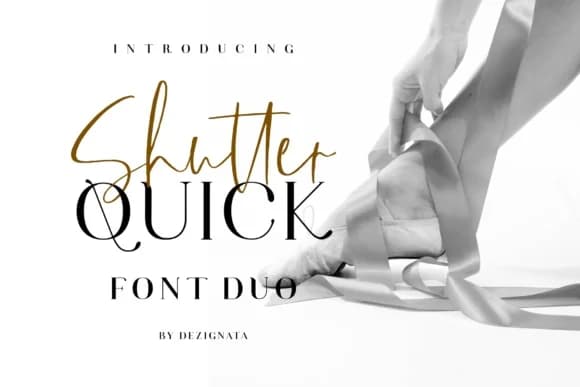 1 / 9
1 / 9About Shutter Quick Font
Shutter Quick by anata.sholeha is a dynamic font duo pairing a flowing handwritten script with a sturdy serif family. The collection spans multiple weights and styles, including Script Alt, Serif Bold, and Serif Italic variations, giving you the flexibility to layer visual hierarchy and emphasis within a single cohesive family. Whether you're laying out wedding invitation suites with romantic flair, crafting luxury cosmetics packaging that demands sophistication, designing boutique stationery sets for upscale markets, or assembling mood boards for editorial features, this pairing delivers both personality and polish. The script excels as a headline or decorative accent, while the serif weights provide steady, legible body text and structural support. The combination strikes a balance between handmade warmth and professional refinement, making it equally at home in small business branding and high-end print collateral. Rather than forcing compatibility between mismatched typefaces, this thoughtful duo eliminates selection fatigue, you can confidently build unified designs with complementary characters without cycling through multiple font families. Each style works independently or in concert, opening possibilities from wine labels to wedding programs to luxury product descriptions. The versatility built into this pair means you'll reach for it repeatedly across different projects and seasons. Discover Shutter Quick on Creative Fabrica and create designs that marry script sophistication with serif strength.
Style & Use Cases
- Overall Style
- Elegant, Flowing, Shutter Quick Script
- Use Case
- Invitations, Branding
- Ideal For
- wedding stationery, greeting cards, and signatures
- Pairs With
- a simple uppercase sans
How to Install Shutter Quick Font Font
Step-by-step instructions for every platform
- 1Download the Shutter Quick Font font file (.ttf or .otf).
- 2Locate the downloaded file in your Downloads folder.
- 3Right-click the font file.
- 4Select "Install" to install for the current user, or "Install for all users" to make it available system-wide.
- 5Shutter Quick Font is now available in Word, Photoshop, Illustrator, and all other apps.
More by anata.sholeha
View all →


Browse fonts by theme
Curated collections →Saw a font in a picture? Identify any font from an image with our free Font Finder.
More Script Handwritten Fonts
Browse all →







What pairs well with Shutter Quick Font?
Shutter Quick Font is a script font that shines as a display or heading face. Pair it with a clean sans-serif or serif font for body text — the contrast creates a clear hierarchy while the two styles stay balanced and easy to read.



Shutter Quick Font
Reviewed by the FontBoxDL team · Updated May 2026