 Firefox
 1 / 9
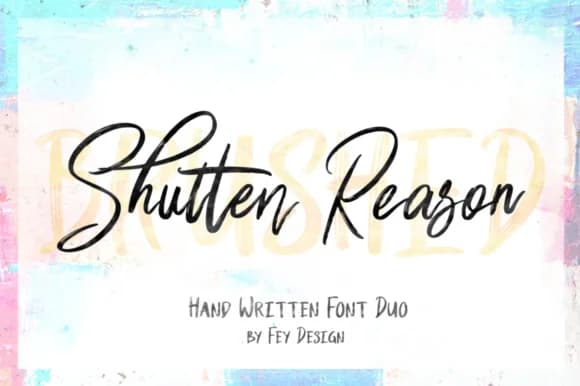
1 / 9About Shutten Reason Font
Shutten Reason by feydesign is a dual-typeface collection pairing a flowing handwritten brush with a clean sans serif. This thoughtful combination offers the flexibility to merge organic warmth with contemporary clarity, making it a valuable asset for designers seeking both character and functionality in a single font family.
The duo excels across specific applications including wedding invitation suites, where the brush script captures attention on headers and decorative accents while the sans serif handles ceremony details with precision. It performs equally well for boutique product label design that needs personality alongside legibility, DIY hand-lettered signage projects that blend handmade charm with professional polish, and independent brand identity work that benefits from this versatile tonal range. The handwritten component brings authentic character to display applications and attention-grabbing headlines, while the sans serif ensures clear communication across body copy and supporting text blocks. This strategic pairing allows designers to craft cohesive layouts that feel personable and warm without sacrificing readability across different contexts and applications.
Get the Shutten Reason Font on Creative Fabrica and unlock the full potential of this complementary typeface pairing.
Style & Use Cases
- Overall Style
- Elegant, Flowing, Shutten Reason
- Use Case
- Invitations, Branding
- Ideal For
- wedding stationery, greeting cards, and signatures
- Pairs With
- a simple uppercase sans
How to Install Shutten Reason Font Font
Step-by-step instructions for every platform
- 1Download the Shutten Reason Font font file (.ttf or .otf).
- 2Locate the downloaded file in your Downloads folder.
- 3Right-click the font file.
- 4Select "Install" to install for the current user, or "Install for all users" to make it available system-wide.
- 5Shutten Reason Font is now available in Word, Photoshop, Illustrator, and all other apps.
Browse fonts by theme
Curated collections →Saw a font in a picture? Identify any font from an image with our free Font Finder.
More Script Handwritten Fonts
Browse all →







What pairs well with Shutten Reason Font?
Shutten Reason Font is a script font that shines as a display or heading face. Pair it with a clean sans-serif or serif font for body text — the contrast creates a clear hierarchy while the two styles stay balanced and easy to read.



Shutten Reason Font
by feydesign
Reviewed by the FontBoxDL team · Updated May 2026