 Firefox
 1 / 8
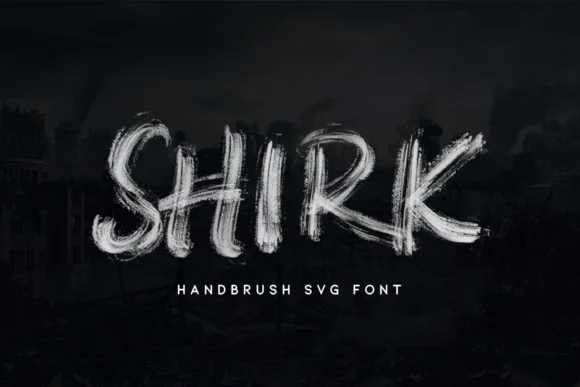
1 / 8About Shirk Font
Shirk by MLKWSN studio is a color font built from organic, hand-painted letterforms that genuinely feel like they came from a brush. The SVG-based design captures the texture and spontaneity of actual brush work, with each letter holding that loose, confident energy that only hand-lettering can deliver. You get the authentic imperfection and flowing character without having to hand-letter every single project from scratch.
This font works best for intimate, handmade-feeling projects. Consider it for artisanal product packaging, watercolor-style social media graphics, personalized greeting card designs, or small-batch cosmetics branding. These are the spaces where the genuine brush character really shines and makes work feel personal rather than templated. Because it's a color font, the visual richness of the brushwork is built in, so there's no extra layering or color-picking work needed to achieve that natural, painted look that DIY makers and print-on-demand shops have come to expect.
As an OpenType-SVG file, Shirk works in Photoshop, Illustrator, Silhouette, and Inkscape, giving you solid flexibility across major design tools. Cricut isn't compatible with this color font format, but you're fully covered if you work in mainstream design software. Get Shirk on Creative Fabrica and bring that handmade authenticity to your next project.
Style & Use Cases
- Overall Style
- Playful, Vibrant
- Use Case
- Stickers, Social
- Ideal For
- kids' designs, party graphics, and playful branding
- Pairs With
- a simple rounded sans
How to Install Shirk Font
Step-by-step instructions for every platform
- 1Download the Shirk font file (.ttf or .otf).
- 2Locate the downloaded file in your Downloads folder.
- 3Right-click the font file.
- 4Select "Install" to install for the current user, or "Install for all users" to make it available system-wide.
- 5Shirk is now available in Word, Photoshop, Illustrator, and all other apps.
More by MLKWSN studio
View all →
Browse fonts by theme
Curated collections →Saw a font in a picture? Identify any font from an image with our free Font Finder.
More Color Fonts Fonts
Browse all →
What pairs well with Shirk Font?
Shirk Font is a color font that shines as a display or heading face. Pair it with a clean sans-serif or serif font for body text — the contrast creates a clear hierarchy while the two styles stay balanced and easy to read.




Shirk Font
Reviewed by the FontBoxDL team · Updated September 2026