 Firefox
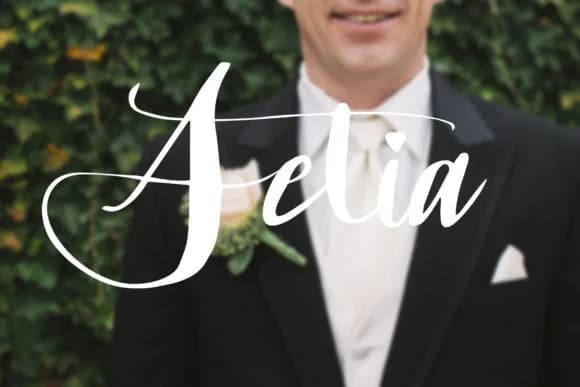 1 / 4
1 / 4About Setia Font
Setia carries a brushy, contemporary energy that balances feminine curves with genuine attitude, completely sidestepping ornate-script clichés. This handwritten script from goodigital reads as approachable and genuinely alive, making it ideal for designers who want typography that actually feels real rather than overly polished or merely decorative. The letterforms move with real personality and work equally well as headline statements or delicate accents, adapting across different contexts without losing their distinctive character.
Fashion brands gravitate toward it for lookbook headlines and social media graphics. Artisan companies use it beautifully on product labels, whether that's artisanal skincare, specialty goods, or hand-poured products where handwritten authenticity matters. Custom invitation suites benefit from its energy when you want modern romance to beat traditional formality. Greeting card designs that need genuine warmth rather than saccharine sweetness find their voice here. The font works best when authenticity truly matters to your brand story, not as mere visual decoration.
Pair Setia with a clean, geometric sans-serif for body text to create dynamic visual contrast across your branding system. This kind of pairing keeps everything grounded while letting your script font shine where it matters most. You'll find it on Creative Fabrica, ready to transform your next design project.
Style & Use Cases
- Overall Style
- Elegant, Flowing, Attitude
- Use Case
- Invitations, Branding
- Ideal For
- wedding stationery, greeting cards, and signatures
- Pairs With
- a simple uppercase sans
How to Install Setia Font Font
Step-by-step instructions for every platform
- 1Download the Setia Font font file (.ttf or .otf).
- 2Locate the downloaded file in your Downloads folder.
- 3Right-click the font file.
- 4Select "Install" to install for the current user, or "Install for all users" to make it available system-wide.
- 5Setia Font is now available in Word, Photoshop, Illustrator, and all other apps.
More by goodigital
View all →
Browse fonts by theme
Curated collections →Saw a font in a picture? Identify any font from an image with our free Font Finder.
More Script Handwritten Fonts
Browse all →







What pairs well with Setia Font?
Setia Font is a script font that shines as a display or heading face. Pair it with a clean sans-serif or serif font for body text — the contrast creates a clear hierarchy while the two styles stay balanced and easy to read.



Setia Font
by goodigital
Reviewed by the FontBoxDL team · Updated September 2026