 Firefox
 1 / 8
1 / 8About Senar Font
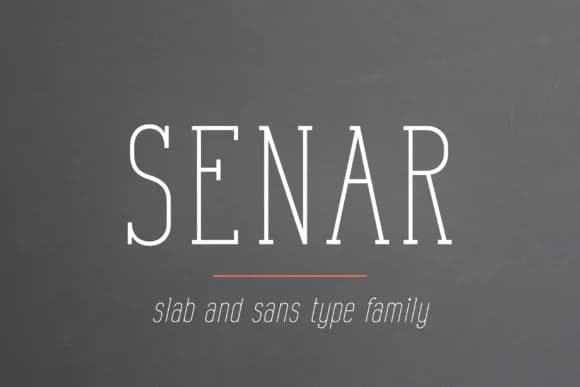
Senar by Pasha Larin is a thin, extended slab serif built for bold branding and editorial applications. Its distinctive narrow proportions paired with geometric slab details create a contemporary aesthetic, especially suited for logos and brand identity systems where restraint and precision drive the visual direction. The extended letterforms and thin stroke weight allow the face to read as elegant and refined at any scale, from compact logo marks to towering billboard advertisements.
Magazine spreads and book cover designs benefit immensely from this typeface's consistent proportions and controlled line weight, which command visual authority without the heaviness that can weigh down editorial layouts. The thin strokes also work beautifully on cosmetic and fashion packaging labels, where they signal a premium, sophisticated approach to brand positioning. You'll find Senar equally effective for Instagram Stories and social media graphics that need to cut through busy feeds, plus web-based advertising where both legibility and distinctive personality matter in equal measure. The font supports multiple languages and includes useful alternates for fine-tuning letterforms to fit your specific branding needs.
Get Senar on Creative Fabrica to add it to your next brand identity, editorial project, or packaging system.
Style & Use Cases
- Overall Style
- Sturdy, Confident, Slab Serif
- Use Case
- Headlines, Merch
- Ideal For
- vintage posters, logos, and product packaging
- Pairs With
- a light sans-serif
How to Install Senar Font
Step-by-step instructions for every platform
- 1Download the Senar font file (.ttf or .otf).
- 2Locate the downloaded file in your Downloads folder.
- 3Right-click the font file.
- 4Select "Install" to install for the current user, or "Install for all users" to make it available system-wide.
- 5Senar is now available in Word, Photoshop, Illustrator, and all other apps.
More by Pasha Larin
View all →
Browse fonts by theme
Curated collections →Saw a font in a picture? Identify any font from an image with our free Font Finder.
More Slab Serif Fonts
Browse all →







What pairs well with Senar Font?
Senar Font is a slab serif font that shines as a display or heading face. Pair it with a clean sans-serif or serif font for body text — the contrast creates a clear hierarchy while the two styles stay balanced and easy to read.



Senar Font
by Pasha Larin
Reviewed by the FontBoxDL team · Updated September 2026