 Firefox
 1 / 3
1 / 3Loading font…
About Scripto Font
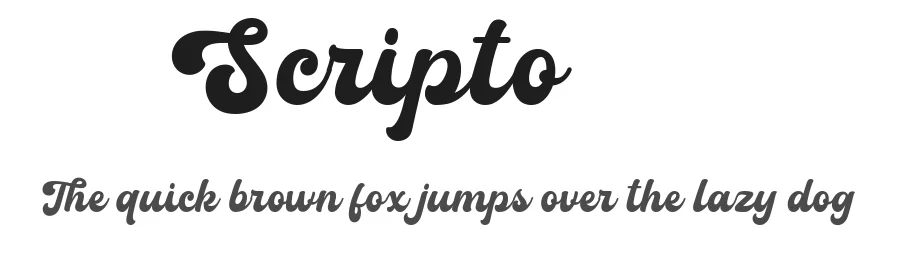
Picture yourself designing a wedding invitation suite, and you need handwriting that feels genuine but still polished. That's where Scripto by Rizky Awaludin steps in. This handwritten script captures the flow of pen on paper without sacrificing legibility, making it ideal for invitation suites, Etsy product labels, boutique skincare packaging, and DIY craft signage. The 109+ language support (Latin-based) means you can work with clients and projects across the globe without needing to swap typefaces mid-project.
Scripto's casual elegance works because it doesn't try too hard. The natural rhythm of the letterforms reads as authentic rather than overly decorated, which makes it friendly at both small and large sizes. This balance is what separates handwritten scripts from their more ornamental cousins. You'll find it works equally well for greeting cards, thank-you stationery, personalized gift tags, and small-business brand lettering where genuine warmth matters more than formal polish. There's an unpretentious quality that clients respond to.
Try the free demo on our page for personal projects. When you need the full commercial version with a proper license, grab it on Creative Fabrica. At display sizes, give Scripto a little breathing room in your layouts. The handwritten character works best when it can truly shine.
Style & Use Cases
- Overall Style
- Elegant, Flowing, Handwritten
- Use Case
- Invitations, Branding
- Ideal For
- wedding stationery, greeting cards, and signatures
- Pairs With
- a simple uppercase sans
Scripto Specifications
| Font Family | Normal |
| Style | Regular |
| Full Name | Normal |
| Version | 1.000 |
| Weight | 400 (Regular) |
| Glyph Count | 180 glyphs |
| PostScript Name | Scripto |
| Designer | Rizky Awaludin |
| Format | TTF (TrueType) |
| File Size | 109.5 KB |
OpenType Features
Scripto ships with 2 OpenType features you can switch on in apps that support them (Illustrator, InDesign, Affinity, Figma, CSS font-feature-settings).
- Standard ligatures
- Stylistic sets (12)
Languages Supported
Scripto supports 109 languages.
How to Install Scripto Font
Step-by-step instructions for every platform
- 1Download the Scripto font file (.ttf or .otf).
- 2Locate the downloaded file in your Downloads folder.
- 3Right-click the font file.
- 4Select "Install" to install for the current user, or "Install for all users" to make it available system-wide.
- 5Scripto is now available in Word, Photoshop, Illustrator, and all other apps.
More by Rizky Awaludin
View all →
Browse fonts by theme
Curated collections →Saw a font in a picture? Identify any font from an image with our free Font Finder.
More Script Handwritten Fonts
Browse all →







What pairs well with Scripto Font?
Scripto Font is a script font that shines as a display or heading face. Pair it with a clean sans-serif or serif font for body text — the contrast creates a clear hierarchy while the two styles stay balanced and easy to read.




Scripto Font
Reviewed by the FontBoxDL team · Updated August 2026