 Firefox
 1 / 8
1 / 8About Santa Clarita Font
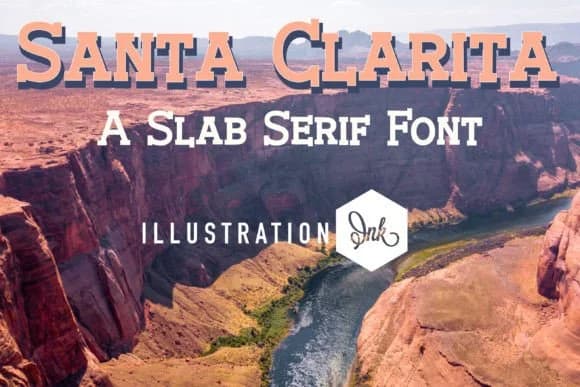
Picture a weathered wooden sign swinging above a saloon door, or lettering on a vintage wanted poster: that's where Santa Clarita shines. Designed by Illustration Ink, this slab serif draws authenticity from Old West aesthetics while staying grounded enough for modern applications. The heavy stroke weight and squared serifs create genuine visual impact at large sizes, making it a natural fit for saloon menu design, vintage Western wedding invitations, rustic cabin signage, and craft brewery label lettering. Its hand-crafted character brings warmth to retro vintage poster headers and cowboy-themed event branding without sacrificing legibility.
What makes Santa Clarita work across so many contexts is its balance. Blocky letterforms have real authority without becoming theatrical or dated. Scale it up for signage and the thick strokes maintain their presence; drop it into smaller point sizes and it still reads with purpose. Santa Clarita walks that tightrope between quirky charm and professional restraint, which means it works equally well on a backyard wedding invitation as it does for ranch branding or a rustic lodge menu.
The technical execution matters here too. Santa Clarita's substantial stroke weight keeps thick letterforms holding their form across applications, from print to digital. Grab it on Creative Fabrica and add some genuine Western character to your next project.
Style & Use Cases
- Overall Style
- Sturdy, Confident, Slab Serif
- Use Case
- Headlines, Merch
- Ideal For
- vintage posters, logos, and product packaging
- Pairs With
- a light sans-serif
How to Install Santa Clarita Font
Step-by-step instructions for every platform
- 1Download the Santa Clarita font file (.ttf or .otf).
- 2Locate the downloaded file in your Downloads folder.
- 3Right-click the font file.
- 4Select "Install" to install for the current user, or "Install for all users" to make it available system-wide.
- 5Santa Clarita is now available in Word, Photoshop, Illustrator, and all other apps.
More by Illustration Ink
View all →



Browse fonts by theme
Curated collections →Saw a font in a picture? Identify any font from an image with our free Font Finder.
More Slab Serif Fonts
Browse all →







What pairs well with Santa Clarita Font?
Santa Clarita Font is a slab serif font that shines as a display or heading face. Pair it with a clean sans-serif or serif font for body text — the contrast creates a clear hierarchy while the two styles stay balanced and easy to read.



Santa Clarita Font
Reviewed by the FontBoxDL team · Updated September 2026