 Firefox
 1 / 8
1 / 8About Ruganic Font
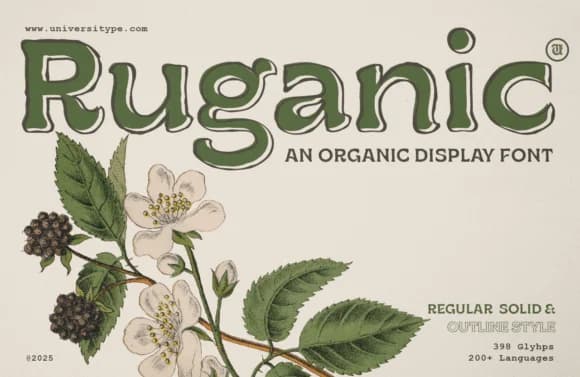
The letterforms in Ruganic, designed by Universitype, carry an earthy weight and texture that immediately evokes hand-carved letterpress work and vintage botanical lettering found on old seed packets and natural product labels from decades past. This slab-serif typeface successfully marries tactile craftsmanship with clean modern readability, making it equally effective in heritage branding and contemporary editorial projects, bringing distinct character through intentional imperfections and subtle irregularities in every letter.
The font excels on organic skincare packaging, farm-to-table food labels, and boutique wellness product boxes where warmth and authenticity ring true at first glance. Environmental graphics, local business signage, and editorial layouts for sustainability-focused publications all gain genuine depth from its grounded, unpretentious personality. Built with multiple font weights and styles, extended multilingual support, and sophisticated OpenType features, Ruganic gives you the fine control needed for nuanced typographic work across both print and digital mediums, from packaging design to web applications.
This typeface serves designers and brand builders in the natural, artisanal, and sustainable product space who want their type to feel genuinely handmade and purposeful rather than corporate or generic. It's the right choice when authenticity matters. You'll find Ruganic on Creative Fabrica, ready to download and integrate into your next design project.
Style & Use Cases
- Overall Style
- Sturdy, Confident, Ut Ruganic Font
- Use Case
- Headlines, Merch
- Ideal For
- vintage posters, logos, and product packaging
- Pairs With
- a light sans-serif
How to Install Ruganic Font
Step-by-step instructions for every platform
- 1Download the Ruganic font file (.ttf or .otf).
- 2Locate the downloaded file in your Downloads folder.
- 3Right-click the font file.
- 4Select "Install" to install for the current user, or "Install for all users" to make it available system-wide.
- 5Ruganic is now available in Word, Photoshop, Illustrator, and all other apps.
More by Universitype
View all →
Browse fonts by theme
Curated collections →Saw a font in a picture? Identify any font from an image with our free Font Finder.
More Slab Serif Fonts
Browse all →







What pairs well with Ruganic Font?
Ruganic Font is a slab serif font that shines as a display or heading face. Pair it with a clean sans-serif or serif font for body text — the contrast creates a clear hierarchy while the two styles stay balanced and easy to read.



Ruganic Font
by Universitype
Reviewed by the FontBoxDL team · Updated August 2026