 Firefox
 1 / 9
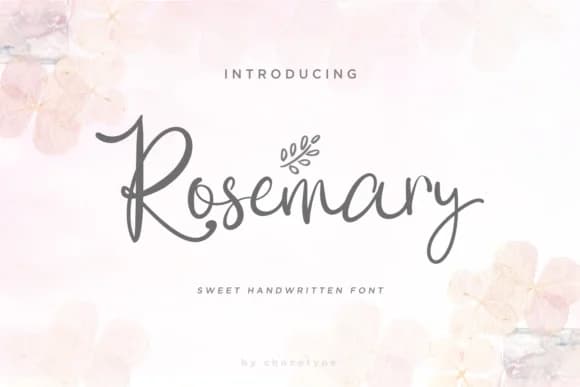
1 / 9About Rosemary Script Font
Rosemary Script Font by Chocotype is a handcrafted script typeface with playful, energetic letterforms and a bouncy baseline that brings character and warmth to every application. The font performs beautifully across wedding invitation suites, personalized Etsy product labels, artisanal packaging for boutique skincare and cosmetics brands, and DIY craft signage where handmade authenticity outweighs corporate polish. What truly distinguishes Rosemary is its generous collection of alternate characters, you can swap letterforms within the same word to ensure endless variation and uniqueness, plus decorative doodles included as a bonus that add whimsy to your layouts without overwhelming the overall composition. Whether you're crafting custom stationery, hand-lettered greeting cards, small-batch product packaging, or personal branding collateral, these alternates ensure no two words need look identical. The doodles pair beautifully with your letterforms as decorative accents, or you can use them sparingly for subtle visual interest. The bouncy baseline keeps layouts feeling organic and approachable rather than rigid or outdated, resonating with audiences who value genuine, human-crafted aesthetics over mass-produced alternatives. Get Rosemary Script Font on Creative Fabrica and bring your most personal design visions to life.
Style & Use Cases
- Overall Style
- Elegant, Flowing, Rosemary
- Use Case
- Invitations, Branding
- Ideal For
- wedding stationery, greeting cards, and signatures
- Pairs With
- a simple uppercase sans
How to Install Rosemary Script Font Font
Step-by-step instructions for every platform
- 1Download the Rosemary Script Font font file (.ttf or .otf).
- 2Locate the downloaded file in your Downloads folder.
- 3Right-click the font file.
- 4Select "Install" to install for the current user, or "Install for all users" to make it available system-wide.
- 5Rosemary Script Font is now available in Word, Photoshop, Illustrator, and all other apps.
More by Chocotype
View all →

Browse fonts by theme
Curated collections →Saw a font in a picture? Identify any font from an image with our free Font Finder.
More Script Handwritten Fonts
Browse all →







What pairs well with Rosemary Script Font?
Rosemary Script Font is a script font that shines as a display or heading face. Pair it with a clean sans-serif or serif font for body text — the contrast creates a clear hierarchy while the two styles stay balanced and easy to read.



Rosemary Script Font
by Chocotype
Reviewed by the FontBoxDL team · Updated May 2026