 Firefox
 1 / 9
1 / 9About Rogue One Font
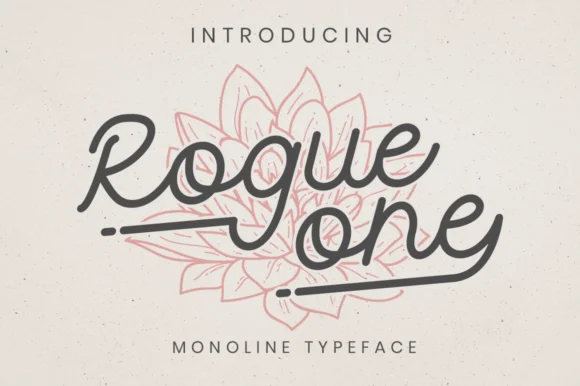
Rogue One by attypestudio is a monoline script that pairs clean, readable letterforms with flowing decorative swashes. It's ideal for wedding invitation suites, artisan food packaging, personalized greeting cards, and hand-lettered logo design. The single-line weight stays legible across sizes, so you can scale it up for statement pieces or down to smaller applications without the forms becoming too delicate or unclear.
What makes this script work is its restraint. The swashes feel purposeful rather than overdone, and the monoline consistency creates a contemporary look that never tips into mechanical. That stability means it translates well across printing methods and digital uses alike. Designers reach for Rogue One when they need a script with personality and sophistication, whether that's custom wedding stationery, boutique skincare labeling, or artisan jewelry branding. The structured construction also lets you pair it with other typefaces or use it as a standalone statement without sacrificing readability.
This is a script that earns its swashes through strategic use rather than arbitrary flourish. The result is a font that feels intentional and human, made for projects where personality and refinement matter equally. Find Rogue One on Creative Fabrica and add it to your toolkit.
Style & Use Cases
- Overall Style
- Elegant, Flowing, Rogue One
- Use Case
- Invitations, Branding
- Ideal For
- wedding stationery, greeting cards, and signatures
- Pairs With
- a simple uppercase sans
How to Install Rogue One Font Font
Step-by-step instructions for every platform
- 1Download the Rogue One Font font file (.ttf or .otf).
- 2Locate the downloaded file in your Downloads folder.
- 3Right-click the font file.
- 4Select "Install" to install for the current user, or "Install for all users" to make it available system-wide.
- 5Rogue One Font is now available in Word, Photoshop, Illustrator, and all other apps.
More by attypestudio
View all →
Browse fonts by theme
Curated collections →Saw a font in a picture? Identify any font from an image with our free Font Finder.
More Script Handwritten Fonts
Browse all →







What pairs well with Rogue One Font?
Rogue One Font is a script font that shines as a display or heading face. Pair it with a clean sans-serif or serif font for body text — the contrast creates a clear hierarchy while the two styles stay balanced and easy to read.




Rogue One Font
by attypestudio
Reviewed by the FontBoxDL team · Updated August 2026