 Firefox
 1 / 4
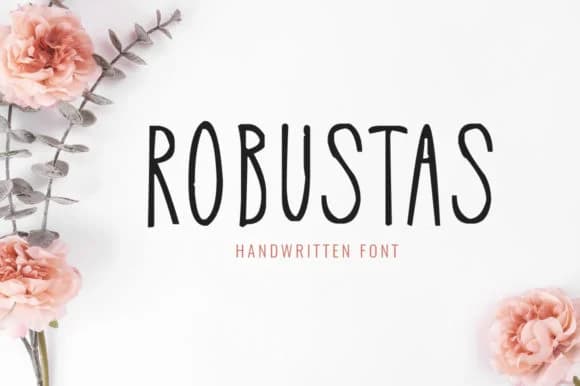
1 / 4About Robustas Font
Picture yourself designing a wedding invitation suite with hand-lettered details, and you reach for a typeface that looks genuinely written rather than artificially rendered. That's Robustas, a script font from FontCove that carries the warmth of pen-on-paper without feeling forced or overly stylized.
The font shines whenever a project requires a personal, handwritten touch. Custom skincare labels for a small-batch business benefit from its approachable, organic quality, while calligraphy-inspired greeting cards and thank-you notes feel genuinely intimate with Robustas set inside. Hand-lettered menu covers for boutique restaurants capture something authentically personal that pure digital type struggles to convey. Even DIY craft signage and gift tags gain an understated presence when rendered in this script rather than something more geometric or rigid. The light weight keeps letterforms readable at smaller sizes, yet the flowing character remains steady and assured, making it genuinely feel like someone sat down and carefully wrote each letter rather than a designer's calculated interpretation.
What truly distinguishes Robustas is how cleanly it renders at large display sizes, where individual letterforms stay open and expressive without becoming unwieldy or cramped. You'll find it ready to download on Creative Fabrica whenever your next project needs that authentic, handwritten quality.
Style & Use Cases
- Overall Style
- Elegant, Flowing, Robustas
- Use Case
- Invitations, Branding
- Ideal For
- wedding stationery, greeting cards, and signatures
- Pairs With
- a simple uppercase sans
How to Install Robustas Font Font
Step-by-step instructions for every platform
- 1Download the Robustas Font font file (.ttf or .otf).
- 2Locate the downloaded file in your Downloads folder.
- 3Right-click the font file.
- 4Select "Install" to install for the current user, or "Install for all users" to make it available system-wide.
- 5Robustas Font is now available in Word, Photoshop, Illustrator, and all other apps.
Browse fonts by theme
Curated collections →Saw a font in a picture? Identify any font from an image with our free Font Finder.
More Script Handwritten Fonts
Browse all →







What pairs well with Robustas Font?
Robustas Font is a script font that shines as a display or heading face. Pair it with a clean sans-serif or serif font for body text — the contrast creates a clear hierarchy while the two styles stay balanced and easy to read.



Robustas Font
by FontCove
Reviewed by the FontBoxDL team · Updated June 2026