 Firefox
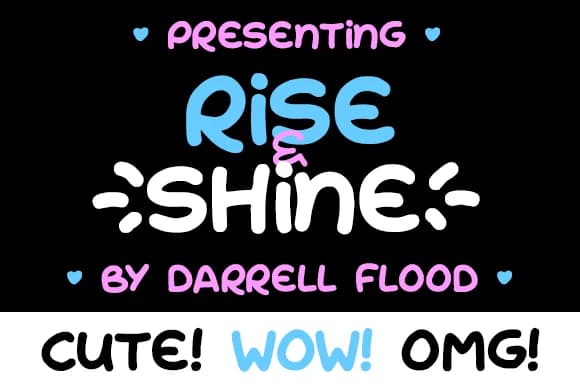
About Rise & Shine Font
Rise & Shine Font by Dadiomouse is a hand-drawn script with a playful, uplifting character that combines mixed-case letterforms for a warm, personal touch. The thoughtful combination of upper and lower case characters creates natural rhythm and visual variation, making each word feel genuinely handwritten rather than mechanically rendered. This balance between casual and readable makes it accessible for projects that need authenticity without sacrificing clarity.
This font excels in creating engaging typography for wedding invitation suites where couples want personality and warmth over rigid formality. It's equally effective for coffee shop and cafe menu designs seeking an approachable, friendly aesthetic that invites customers in. Social media graphics for wellness and lifestyle brands benefit tremendously from its optimistic energy, while greeting card designers find it ideal for conveying genuine warmth and emotional connection. The playful nature also makes it well-suited for small-scale product packaging, boutique labels, and personalized stationery projects where individuality and character matter.
The hand-drawn quality gives your typography authentic, organic character without requiring actual lettering skills or artistic ability. Whether designing for print or digital applications, Rise & Shine Font brings genuine warmth and personality to your creative work. Discover Rise & Shine Font on Creative Fabrica and transform your projects with authentic, hand-lettered charm.
Style & Use Cases
- Overall Style
- Elegant, Flowing, Rise And Shine
- Use Case
- Invitations, Branding
- Ideal For
- wedding stationery, greeting cards, and signatures
- Pairs With
- a simple uppercase sans
How to Install Rise & Shine Font Font
Step-by-step instructions for every platform
- 1Download the Rise & Shine Font font file (.ttf or .otf).
- 2Locate the downloaded file in your Downloads folder.
- 3Right-click the font file.
- 4Select "Install" to install for the current user, or "Install for all users" to make it available system-wide.
- 5Rise & Shine Font is now available in Word, Photoshop, Illustrator, and all other apps.
More by Dadiomouse
View all →

Browse fonts by theme
Curated collections →Saw a font in a picture? Identify any font from an image with our free Font Finder.
More Script Handwritten Fonts
Browse all →







What pairs well with Rise & Shine Font?
Rise & Shine Font is a script font that shines as a display or heading face. Pair it with a clean sans-serif or serif font for body text — the contrast creates a clear hierarchy while the two styles stay balanced and easy to read.



Rise & Shine Font
by Dadiomouse
Reviewed by the FontBoxDL team · Updated May 2026