 Firefox
 1 / 9
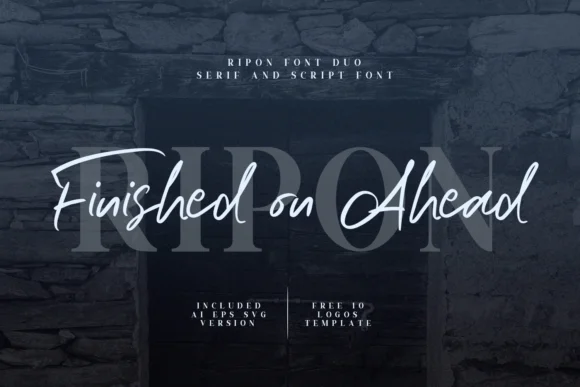
1 / 9About Ripon Duo Font
Ripon Duo Font, designed by Graphicfresh, combines a tailored serif with a flowing script. The partnership gives designers two distinct voices in a single download, with one handling structure and hierarchy while the other brings warmth and movement. Together, they create visual interest that single-font solutions simply can't match.
This is the font for cohesive branding work. Wedding invitation suites benefit from the serif on headers and script for inner text, creating a natural read-through that feels intentional. Logo suites built with both styles give clients options: the serif for corporate contexts, the script for packaging or signage. Stationery design becomes noticeably richer when you have serif forms anchoring letterheads and script flourishes bringing personality to reply cards or thank-you notes. Boutique packaging labels, product label designs, and book cover lettering all work better when you combine formal serif authority with playful script.
This font suits designers building cohesive brand identities across multiple touchpoints where serif authority and script warmth work in concert. Your kit includes both complete fonts plus 10 pre-built logo templates to jumpstart your designs. Grab Ripon Duo on Creative Fabrica and see what two complementary typefaces can do for your next project.
Style & Use Cases
- Overall Style
- Elegant, Flowing, Ripon Script
- Use Case
- Invitations, Branding
- Ideal For
- wedding stationery, greeting cards, and signatures
- Pairs With
- a simple uppercase sans
How to Install Ripon Duo Font Font
Step-by-step instructions for every platform
- 1Download the Ripon Duo Font font file (.ttf or .otf).
- 2Locate the downloaded file in your Downloads folder.
- 3Right-click the font file.
- 4Select "Install" to install for the current user, or "Install for all users" to make it available system-wide.
- 5Ripon Duo Font is now available in Word, Photoshop, Illustrator, and all other apps.
More by Graphicfresh
View all →
Browse fonts by theme
Curated collections →Saw a font in a picture? Identify any font from an image with our free Font Finder.
More Script Handwritten Fonts
Browse all →







What pairs well with Ripon Duo Font?
Ripon Duo Font is a script font that shines as a display or heading face. Pair it with a clean sans-serif or serif font for body text — the contrast creates a clear hierarchy while the two styles stay balanced and easy to read.




Ripon Duo Font
by Graphicfresh
Reviewed by the FontBoxDL team · Updated May 2026