 Firefox
 1 / 8
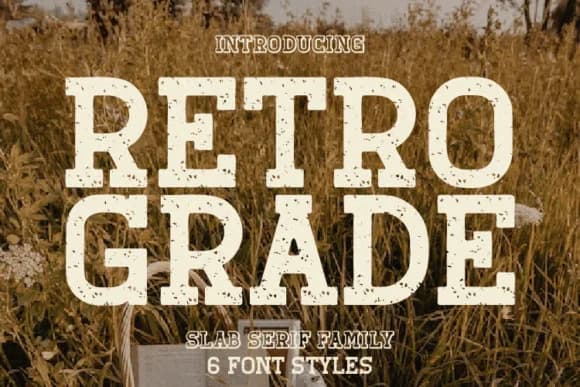
1 / 8About Retro Grade Font
This one nails that particular sweet spot between retro cool and hands-on grit. Retro Grade, designed by Rvandtype, channels the heavyweight slab serif energy of mid-century letterpress work straight into modern design, with a deliberately weathered texture that keeps everything feeling lived-in and genuine rather than overly refined or precious. The roughed-up edges aren't a shortcoming at all, they're intentional, giving the font real character without asking you to treat it like some museum piece.
You'll find it earning its keep on vintage record sleeves, boho wedding invitations, thrift-store signage, and hand-lettered product packaging where texture and authenticity matter far more than perfection. Logo work carries entirely different weight with this font backing it. Groovy festival posters, DIY craft signage, and letterpress-style print collateral all benefit from its straightforward, unapologetic personality. Multiple weight options and extended character coverage give you the flexibility needed for Procreate lettering, full print design, or custom letterform exploration and experimentation.
Pair Retro Grade with a clean, contemporary sans-serif typeface like Karla or Inter to balance the visual heaviness and preserve readability across longer text passages. Grab it on Creative Fabrica and get to work building something with genuine character and deep history baked straight in.
Style & Use Cases
- Overall Style
- Sturdy, Confident, Retro
- Use Case
- Headlines, Merch
- Ideal For
- vintage posters, logos, and product packaging
- Pairs With
- a light sans-serif
How to Install Retro Grade Font
Step-by-step instructions for every platform
- 1Download the Retro Grade font file (.ttf or .otf).
- 2Locate the downloaded file in your Downloads folder.
- 3Right-click the font file.
- 4Select "Install" to install for the current user, or "Install for all users" to make it available system-wide.
- 5Retro Grade is now available in Word, Photoshop, Illustrator, and all other apps.
More by Rvandtype
View all →
Browse fonts by theme
Curated collections →Saw a font in a picture? Identify any font from an image with our free Font Finder.
More Slab Serif Fonts
Browse all →







What pairs well with Retro Grade Font?
Retro Grade Font is a slab serif font that shines as a display or heading face. Pair it with a clean sans-serif or serif font for body text — the contrast creates a clear hierarchy while the two styles stay balanced and easy to read.



Retro Grade Font
by Rvandtype
Reviewed by the FontBoxDL team · Updated September 2026