 Firefox
 1 / 6
1 / 6About Raphaelum Font
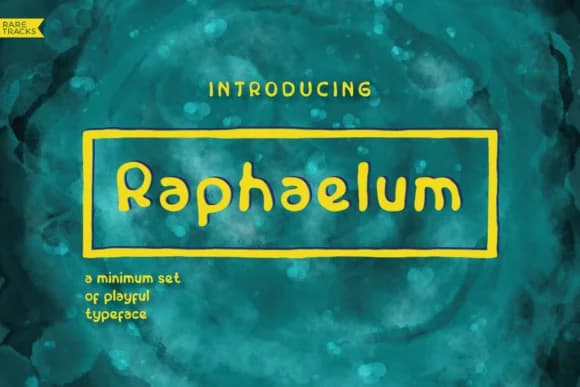
Raphaelum Font by svitch and sober is an exuberant script that authentically captures the spirited charm of youthful penmanship. Inspired by the natural creativity of childhood, the typeface brings flowing, organic characters that feel genuinely handwritten and relatable. This purposeful informality creates an immediate sense of warmth and approachability, essential qualities when designing projects meant to connect with younger audiences, celebrate playful expression, or evoke cherished memories of youth. This handwritten font works beautifully across diverse creative applications. Craft charming children's birthday party invitations and matching thank-you cards that feel deeply personal and heartfelt to recipients. Design engaging classroom bulletin board displays and educational posters that resonate with students through their friendly, accessible visual tone. Develop DIY labels for homemade jam jars, artisan cookie boxes, and gift containers where the casual letterforms enhance the authentic, handmade quality. Scrapbooking layouts and memory book designs equally benefit from the font's flowing character, adding cherished authenticity to keepsake pages. The download includes bonus artwork files, two high-resolution 3000x3000px designs ready to integrate alongside your typography projects. Whether you're working on digital designs or print materials, these complementary assets provide additional creative direction. Get Raphaelum Font on Creative Fabrica and add spirited character to your design projects.
Style & Use Cases
- Overall Style
- Elegant, Flowing, Raphaelum
- Use Case
- Invitations, Branding
- Ideal For
- wedding stationery, greeting cards, and signatures
- Pairs With
- a simple uppercase sans
How to Install Raphaelum Font Font
Step-by-step instructions for every platform
- 1Download the Raphaelum Font font file (.ttf or .otf).
- 2Locate the downloaded file in your Downloads folder.
- 3Right-click the font file.
- 4Select "Install" to install for the current user, or "Install for all users" to make it available system-wide.
- 5Raphaelum Font is now available in Word, Photoshop, Illustrator, and all other apps.
More by svitch and sober
View all →

Browse fonts by theme
Curated collections →Saw a font in a picture? Identify any font from an image with our free Font Finder.
More Script Handwritten Fonts
Browse all →







What pairs well with Raphaelum Font?
Raphaelum Font is a script font that shines as a display or heading face. Pair it with a clean sans-serif or serif font for body text — the contrast creates a clear hierarchy while the two styles stay balanced and easy to read.



Raphaelum Font
Reviewed by the FontBoxDL team · Updated May 2026