 Firefox
 1 / 7
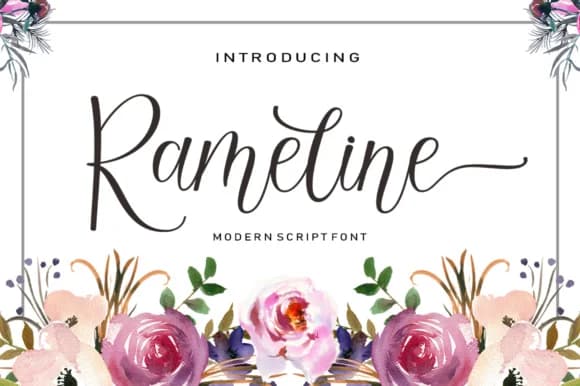
1 / 7About Rameline Script Font
Rameline Script Font by rotterlabstudio is a flowing handwritten script that balances modern sensibilities with timeless elegance. Available in both regular and bold weights, this typeface brings a personal, crafted touch to any project requiring sophisticated character and visual warmth. The dual-weight system allows designers to create dynamic visual hierarchies while maintaining the font's inherent charm across different applications, whether for screen-based interfaces or high-quality print media.
This script excels in specialized design contexts where personality and refinement matter equally to aesthetic impact. Wedding invitation suites benefit from its approachable yet polished stroke quality, while restaurant menu headers and upscale product packaging showcase its ability to convey both accessibility and luxury simultaneously. Event planning professionals, boutique business owners, and freelance designers regularly turn to scripts like this for personalized gift tags, custom branded stationery, elegant monogram work, and luxury event programs that require a handcrafted aesthetic without compromising readability or professional appearance.
Whether you're designing invitation cards for milestone events, developing cosmetics branding for beauty retailers, or creating luxury retail packaging that commands attention and recognition, Rameline Script Font adapts beautifully across diverse contexts and mediums. Get this versatile script on Creative Fabrica and start bringing handcrafted elegance to your next design project.
Style & Use Cases
- Overall Style
- Elegant, Flowing, Rameline
- Use Case
- Invitations, Branding
- Ideal For
- wedding stationery, greeting cards, and signatures
- Pairs With
- a simple uppercase sans
How to Install Rameline Script Font Font
Step-by-step instructions for every platform
- 1Download the Rameline Script Font font file (.ttf or .otf).
- 2Locate the downloaded file in your Downloads folder.
- 3Right-click the font file.
- 4Select "Install" to install for the current user, or "Install for all users" to make it available system-wide.
- 5Rameline Script Font is now available in Word, Photoshop, Illustrator, and all other apps.
More by rotterlabstudio
View all →
Browse fonts by theme
Curated collections →Saw a font in a picture? Identify any font from an image with our free Font Finder.
More Script Handwritten Fonts
Browse all →







What pairs well with Rameline Script Font?
Rameline Script Font is a script font that shines as a display or heading face. Pair it with a clean sans-serif or serif font for body text — the contrast creates a clear hierarchy while the two styles stay balanced and easy to read.



Rameline Script Font
Reviewed by the FontBoxDL team · Updated May 2026