 Firefox
 1 / 5
1 / 5About Radioactive Decay Font
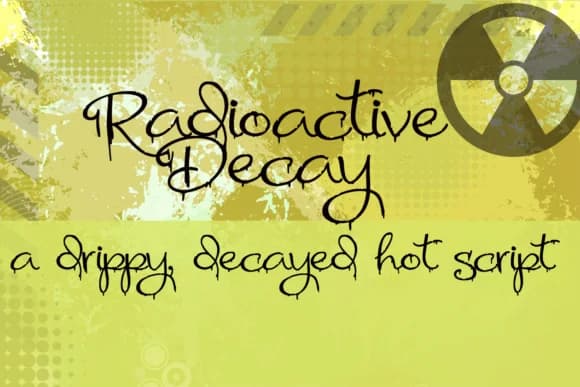
Radioactive Decay by Illustration Ink is a decayed handwritten script with a distinctly melting, grungy aesthetic that brings an edgy character to unconventional design work. The font's distressed letterforms drip and blur with authentic personality, making it an expressive choice for designers seeking to break away from polished, mainstream conventions.
This typeface excels in horror-inspired graphic design, from movie poster lettering and promotional materials to concert flyer typography where an unsettling, artistic edge enhances visual impact. It works equally well for alternative music album covers, underground zine layouts, and experimental tattoo design references where authenticity and raw aesthetic value trump perfection. The dripping letterforms add visceral appeal to spooky event invitations and comic book lettering, where unconventional typography strengthens narrative tension and visual storytelling.
The character set maintains consistent decay effects throughout, supporting varied design applications in niche creative communities. Whether you're crafting eye-catching merchandise for independent artists, designing limited-edition packaging for alternative brands, or building visual identities that celebrate imperfection as a strength, Radioactive Decay delivers distinctive typographic weight and memorable character presence.
Bring this uniquely unsettling typeface into your next creative project by grabbing it on Creative Fabrica.
Style & Use Cases
- Overall Style
- Elegant, Flowing, Radioactive Decay
- Use Case
- Invitations, Branding
- Ideal For
- wedding stationery, greeting cards, and signatures
- Pairs With
- a simple uppercase sans
How to Install Radioactive Decay Font Font
Step-by-step instructions for every platform
- 1Download the Radioactive Decay Font font file (.ttf or .otf).
- 2Locate the downloaded file in your Downloads folder.
- 3Right-click the font file.
- 4Select "Install" to install for the current user, or "Install for all users" to make it available system-wide.
- 5Radioactive Decay Font is now available in Word, Photoshop, Illustrator, and all other apps.
More by Illustration Ink
View all →



Browse fonts by theme
Curated collections →Saw a font in a picture? Identify any font from an image with our free Font Finder.
More Script Handwritten Fonts
Browse all →







What pairs well with Radioactive Decay Font?
Radioactive Decay Font is a script font that shines as a display or heading face. Pair it with a clean sans-serif or serif font for body text — the contrast creates a clear hierarchy while the two styles stay balanced and easy to read.



Radioactive Decay Font
Reviewed by the FontBoxDL team · Updated May 2026