 Firefox
 1 / 9
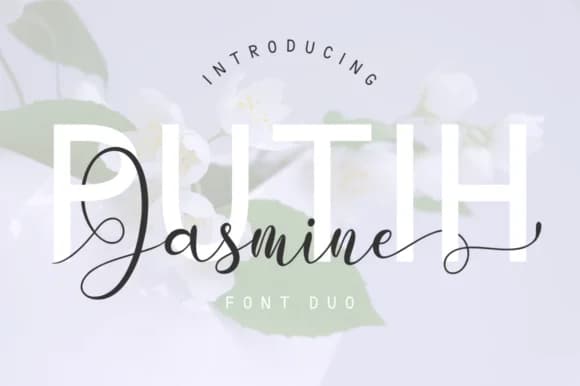
1 / 9About Putih Jasmine Duo Font
Putih Jasmine Duo Font by kammaqsum brings together an elegant script and a clean sans serif, two distinct typefaces that complement each other perfectly but also work beautifully as standalone options. The script component flows with organic curves and deliberate letterforms, creating the kind of warmth that reads as handcrafted without sacrificing legibility. This makes it particularly strong for wedding invitation suites, luxury cosmetics packaging, and fine art gallery promotions where a human touch matters.
The paired sans serif offers a modern counterweight, bringing stability and clarity whenever you need to balance the script's expressiveness. Together they function as a complete typographic system, or you can rely on one or the other depending on your project needs. The font includes swash alternates and style variations that let you adjust the formality level and visual weight across different layout scenarios. Restaurant menus, boutique product labels, and high-end branding materials all benefit from this kind of flexibility.
Both versions carry broad language support and work equally well at display sizes or in body copy, making them genuinely practical for international work beyond the obvious decorative applications. The variations ensure you're not locked into a single look across an entire project. Find Putih Jasmine Duo on Creative Fabrica and have both styles ready for your next project.
Style & Use Cases
- Overall Style
- Elegant, Flowing, Putih Jasmine Script
- Use Case
- Invitations, Branding
- Ideal For
- wedding stationery, greeting cards, and signatures
- Pairs With
- a simple uppercase sans
How to Install Putih Jasmine Duo Font Font
Step-by-step instructions for every platform
- 1Download the Putih Jasmine Duo Font font file (.ttf or .otf).
- 2Locate the downloaded file in your Downloads folder.
- 3Right-click the font file.
- 4Select "Install" to install for the current user, or "Install for all users" to make it available system-wide.
- 5Putih Jasmine Duo Font is now available in Word, Photoshop, Illustrator, and all other apps.
Browse fonts by theme
Curated collections →Saw a font in a picture? Identify any font from an image with our free Font Finder.
More Script Handwritten Fonts
Browse all →







What pairs well with Putih Jasmine Duo Font?
Putih Jasmine Duo Font is a script font that shines as a display or heading face. Pair it with a clean sans-serif or serif font for body text — the contrast creates a clear hierarchy while the two styles stay balanced and easy to read.



Putih Jasmine Duo Font
by kammaqsum
Reviewed by the FontBoxDL team · Updated June 2026