 Firefox
 1 / 8
1 / 8About Pristine Pro Font
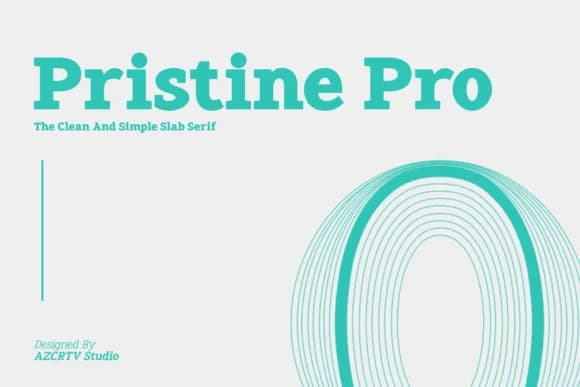
When you're laying out a luxury magazine masthead or designing an identity system for a prestigious law firm, you need a typeface that commands respect without overselling itself. Pristine Pro, created by Azcreative Studio, brings exactly that kind of quiet authority. This slab serif family offers 18 distinct weights from Thin to Black, so you can build visual hierarchy across entire brand systems using a single typeface.
The real strength of slab serifs lies in their ability to feel both corporate and genuinely human. Pristine Pro works brilliantly for upscale packaging on artisan skincare brands, editorial headers in lifestyle publications, restaurant menus that convey craft and quality, and fine jewelry branding that demands gravitas. Its geometric structure keeps letterforms clear and legible whether you're scaling up for impact or down for fine print. The typeface also supports 89 languages including English, French, Spanish, and German, opening doors to campaigns across multiple regions without sacrificing visual consistency.
Because the full weight range covers everything from delicate headlines to bold callouts, it's ideal for building comprehensive brand guidelines in one go. Head to Creative Fabrica to get Pristine Pro and start designing with this sophisticated slab.
Style & Use Cases
- Overall Style
- Sturdy, Confident, Font Family
- Use Case
- Headlines, Merch
- Ideal For
- vintage posters, logos, and product packaging
- Pairs With
- a light sans-serif
How to Install Pristine Pro Font
Step-by-step instructions for every platform
- 1Download the Pristine Pro font file (.ttf or .otf).
- 2Locate the downloaded file in your Downloads folder.
- 3Right-click the font file.
- 4Select "Install" to install for the current user, or "Install for all users" to make it available system-wide.
- 5Pristine Pro is now available in Word, Photoshop, Illustrator, and all other apps.
More by Azcreative Studio
View all →
Browse fonts by theme
Curated collections →Saw a font in a picture? Identify any font from an image with our free Font Finder.
More Slab Serif Fonts
Browse all →







What pairs well with Pristine Pro Font?
Pristine Pro Font is a slab serif font that shines as a display or heading face. Pair it with a clean sans-serif or serif font for body text — the contrast creates a clear hierarchy while the two styles stay balanced and easy to read.



Pristine Pro Font
Reviewed by the FontBoxDL team · Updated September 2026