 Firefox
 1 / 8
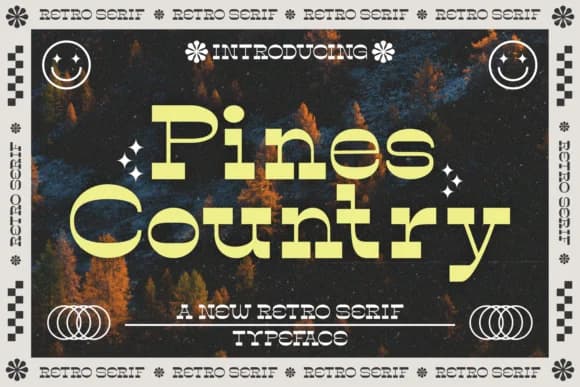
1 / 8About Pines Country Font
Bold and heavily weighted, Pines Country is a slab serif designed by Situjuh that captures the visual DNA of vintage American typography from the early-to-mid twentieth century. The chunky letterforms sit with solid presence on the baseline, making them work equally well in tight headline settings or at much larger display sizes where their mass becomes an asset. This isn't a font playing at nostalgia through trendy shortcuts; it genuinely reads as an authentic throwback to a particular historical moment in design.
You'll find natural applications in vintage restaurant branding, rustic cabin and lodge signage, craft brewery label design, and cottage-core product packaging that needs authentic period character without artificiality or kitsch. The font comes equipped with a full set of glyph variations and decorative swashes, all PUA encoded for straightforward access without hunting through special character menus or key combinations. Multilingual support and accented characters expand its reach across different languages and regional writing systems.
Pines Country works best for designers building retro-leaning brand identities and small business owners after genuine vintage aesthetics rather than superficial design trends. Grab it from Creative Fabrica and put that solid, characterful weight to work in your next retro-focused design project or brand refresh.
Style & Use Cases
- Overall Style
- Sturdy, Confident, Serif
- Use Case
- Headlines, Merch
- Ideal For
- vintage posters, logos, and product packaging
- Pairs With
- a light sans-serif
How to Install Pines Country Font
Step-by-step instructions for every platform
- 1Download the Pines Country font file (.ttf or .otf).
- 2Locate the downloaded file in your Downloads folder.
- 3Right-click the font file.
- 4Select "Install" to install for the current user, or "Install for all users" to make it available system-wide.
- 5Pines Country is now available in Word, Photoshop, Illustrator, and all other apps.

Browse fonts by theme
Curated collections →Saw a font in a picture? Identify any font from an image with our free Font Finder.
More Slab Serif Fonts
Browse all →







What pairs well with Pines Country Font?
Pines Country Font is a slab serif font that shines as a display or heading face. Pair it with a clean sans-serif or serif font for body text — the contrast creates a clear hierarchy while the two styles stay balanced and easy to read.



Pines Country Font
by Situjuh
Reviewed by the FontBoxDL team · Updated September 2026