 Firefox
 1 / 8
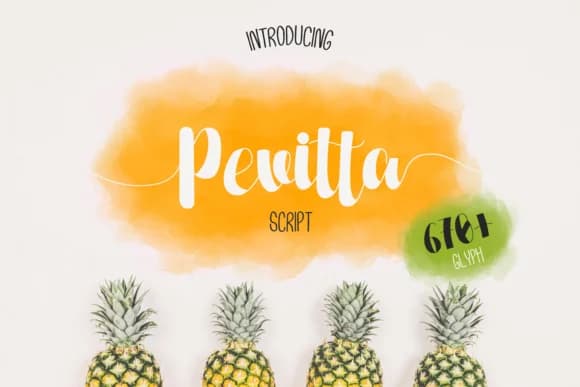
1 / 8About Pevitta Font
Pevitta by Katario Studio is a handwritten script typeface characterized by flowing letterforms and playful embellishments that capture authentic personality. With its blend of elegant curves and spirited flair, this font brings warmth and individuality to designs that need genuine human touch. The typeface works beautifully when you need character that feels both refined and approachable, without relying on trendy styling that dates quickly. Wedding invitation suites benefit from Pevitta's sophisticated presence, where the flowing script enhances ceremony details while maintaining excellent readability. Boutique beauty and cosmetics brands find success with this typeface on product packaging, creating memorable first impressions on shelf. Greeting card collections gain instant personality through its handwritten quality, and custom event signage, whether for weddings, celebrations, or seasonal promotions, showcases its ability to stand out. Designers creating DIY craft projects, monogram designs, or artistic brand logos discover Pevitta delivers the polished-yet-personal aesthetic that modern consumers expect. The typeface offers a remarkable balance between legibility and artistic expression, making it practical for both display and moderate body text applications. Its character set provides comprehensive support for creative projects across different design disciplines. Whether you're establishing a boutique brand identity or producing limited-edition packaging, Pevitta brings a fresh perspective to handwritten scripts. Add this expressive typeface to your collection on Creative Fabrica and unlock new creative possibilities for your designs.
Style & Use Cases
- Overall Style
- Elegant, Flowing, Pevitta
- Use Case
- Invitations, Branding
- Ideal For
- wedding stationery, greeting cards, and signatures
- Pairs With
- a simple uppercase sans
How to Install Pevitta Font Font
Step-by-step instructions for every platform
- 1Download the Pevitta Font font file (.ttf or .otf).
- 2Locate the downloaded file in your Downloads folder.
- 3Right-click the font file.
- 4Select "Install" to install for the current user, or "Install for all users" to make it available system-wide.
- 5Pevitta Font is now available in Word, Photoshop, Illustrator, and all other apps.
More by Katario Studio
View all →

Browse fonts by theme
Curated collections →Saw a font in a picture? Identify any font from an image with our free Font Finder.
More Script Handwritten Fonts
Browse all →







What pairs well with Pevitta Font?
Pevitta Font is a script font that shines as a display or heading face. Pair it with a clean sans-serif or serif font for body text — the contrast creates a clear hierarchy while the two styles stay balanced and easy to read.



Pevitta Font
Reviewed by the FontBoxDL team · Updated May 2026