 Firefox
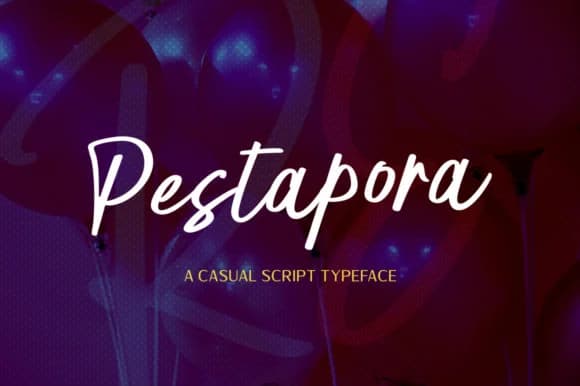 1 / 8
1 / 8About Pestapora Font
Pestapora by locomotype is a bouncy handwritten script with genuine warmth and personality. The letterforms carry that handmade quality without feeling sloppy or unfinished, which is exactly why it lands so well on projects where personality and authenticity matter far more than corporate polish. This font has the rare ability to make custom work actually feel custom again, bringing life to wedding invitation suites, hand-lettered product labels, DIY craft signage, personalized stationery, and event posters where a standard typeface would just feel generic and cold.
Use Pestapora as a standalone display font or pair it with cleaner sans serifs to establish visual hierarchy in your layout. The alternate character set included in the package gives you enough variation to switch things up without needing to hunt for a different font, which keeps your design feeling cohesive while adding visual depth. Small-batch packaging labels, thank-you card series, boutique beauty branding, and hand-lettered event signage all come alive with this kind of script approach. There's something about letterforms that look drawn by hand that connects with people in a way that standard type normally can't quite reach.
Find Pestapora on Creative Fabrica and bring that handcrafted warmth to your next lettering project.
Style & Use Cases
- Overall Style
- Elegant, Flowing, Pestapora
- Use Case
- Invitations, Branding
- Ideal For
- wedding stationery, greeting cards, and signatures
- Pairs With
- a simple uppercase sans
How to Install Pestapora Font Font
Step-by-step instructions for every platform
- 1Download the Pestapora Font font file (.ttf or .otf).
- 2Locate the downloaded file in your Downloads folder.
- 3Right-click the font file.
- 4Select "Install" to install for the current user, or "Install for all users" to make it available system-wide.
- 5Pestapora Font is now available in Word, Photoshop, Illustrator, and all other apps.
More by locomotype
View all →

Browse fonts by theme
Curated collections →Saw a font in a picture? Identify any font from an image with our free Font Finder.
More Script Handwritten Fonts
Browse all →







What pairs well with Pestapora Font?
Pestapora Font is a script font that shines as a display or heading face. Pair it with a clean sans-serif or serif font for body text — the contrast creates a clear hierarchy while the two styles stay balanced and easy to read.



Pestapora Font
by locomotype
Reviewed by the FontBoxDL team · Updated July 2026