 Firefox
 1 / 8
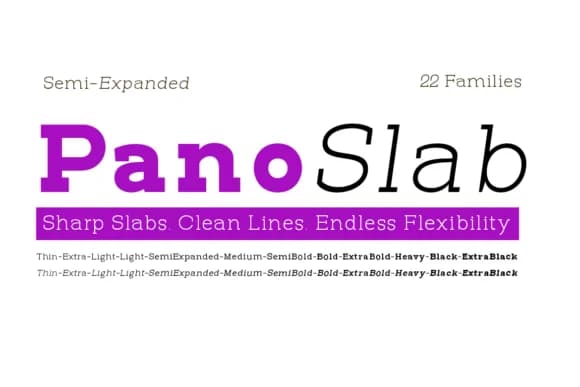
1 / 8About Pano Slab Semi Expanded Font
Pano Slab Semi Expanded delivers confident letterforms through generous horizontal proportions and structured slab geometry that anchors every character with visual presence. Designed by Artisans, this typeface expands the classic Pano Slab foundation horizontally, creating breathing room that reads as both modern and authoritative without sacrificing the warmth that slab serifs bring to expressive typography. The semi-expanded width distinctly sets it apart from more compressed slab families, giving each glyph a grounded, stable feeling that commands attention on the page.
This font excels in contexts where visual weight and legibility matter equally: magazine mastheads that need editorial credibility, luxury brand packaging that demands sophistication, gallery wall poster series with visual impact, and editorial headlines that anchor complex page layouts. Its 11 upright and 11 italic weights (Thin through Extra Black) give designers precision across display scales, letting you shift tone and emphasis while maintaining family cohesion. You can layer weights strategically for contrast or choose a single weight that carries an entire project's voice and identity.
The typeface suits designers building cohesive typographic systems where one family does the structural heavy lifting across multiple applications. If your work involves high-impact editorial design, multi-scale branding systems, or display-driven layouts, this one rewards deeper exploration. Find Pano Slab Semi Expanded on Creative Fabrica.
Style & Use Cases
- Overall Style
- Sturdy, Confident, Handwritten
- Use Case
- Headlines, Merch
- Ideal For
- vintage posters, logos, and product packaging
- Pairs With
- a light sans-serif
How to Install Pano Slab Semi Expanded Font
Step-by-step instructions for every platform
- 1Download the Pano Slab Semi Expanded font file (.ttf or .otf).
- 2Locate the downloaded file in your Downloads folder.
- 3Right-click the font file.
- 4Select "Install" to install for the current user, or "Install for all users" to make it available system-wide.
- 5Pano Slab Semi Expanded is now available in Word, Photoshop, Illustrator, and all other apps.
More by Artisans
View all →
Browse fonts by theme
Curated collections →Saw a font in a picture? Identify any font from an image with our free Font Finder.
More Slab Serif Fonts
Browse all →







What pairs well with Pano Slab Semi Expanded Font?
Pano Slab Semi Expanded Font is a slab serif font that shines as a display or heading face. Pair it with a clean sans-serif or serif font for body text — the contrast creates a clear hierarchy while the two styles stay balanced and easy to read.



Pano Slab Semi Expanded Font
by Artisans
Reviewed by the FontBoxDL team · Updated August 2026