 Firefox
 1 / 8
1 / 8About Osmosis Font
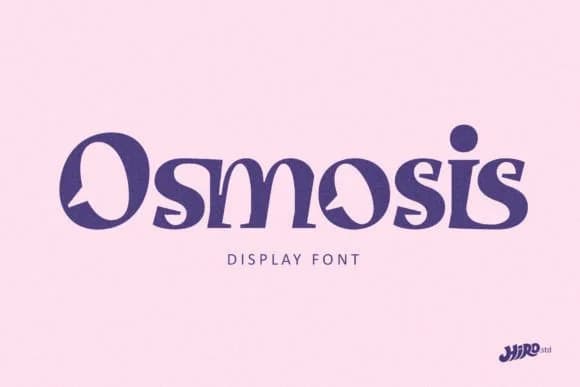
Osmosis by HIRO.std is a bold slab serif that channels retro energy through thoroughly modern sensibilities. The thick, geometric letterforms carry both sporty ease and playful attitude, making them work beautifully across vintage poster designs, magazine mastheads, streetwear brand logos, and bold display-driven editorial work. Its funky character commands visual attention without ever sacrificing legibility, which explains why designers reach for it in athletic event graphics, album covers, and any project where personality needs to be front and center. The font refuses to whisper or take a back seat.
The chunky slab structure gives Osmosis genuine architectural weight that translates beautifully across different sizes and contexts. It functions equally well as a headline anchor, a logo identity system, or the dominant voice in vintage-inspired packaging and merchandise design. What makes it so versatile is how the geometric precision means every letterform carries consistent visual punch, whether deployed at poster scale or smaller display sizes. Designers building funky brand identities, creating retro product labels, or designing eye-catching editorial spreads find that Osmosis delivers exactly the personality and clarity they need in a single typeface.
Get it from Creative Fabrica and start exploring what this confident slab serif can do for your next display project.
Style & Use Cases
- Overall Style
- Sturdy, Confident, Display Font
- Use Case
- Headlines, Merch
- Ideal For
- vintage posters, logos, and product packaging
- Pairs With
- a light sans-serif
How to Install Osmosis Font
Step-by-step instructions for every platform
- 1Download the Osmosis font file (.ttf or .otf).
- 2Locate the downloaded file in your Downloads folder.
- 3Right-click the font file.
- 4Select "Install" to install for the current user, or "Install for all users" to make it available system-wide.
- 5Osmosis is now available in Word, Photoshop, Illustrator, and all other apps.
More by HIRO.std
View all →


Browse fonts by theme
Curated collections →Saw a font in a picture? Identify any font from an image with our free Font Finder.
More Slab Serif Fonts
Browse all →







What pairs well with Osmosis Font?
Osmosis Font is a slab serif font that shines as a display or heading face. Pair it with a clean sans-serif or serif font for body text — the contrast creates a clear hierarchy while the two styles stay balanced and easy to read.



Osmosis Font
by HIRO.std
Reviewed by the FontBoxDL team · Updated September 2026