 Firefox
 1 / 4
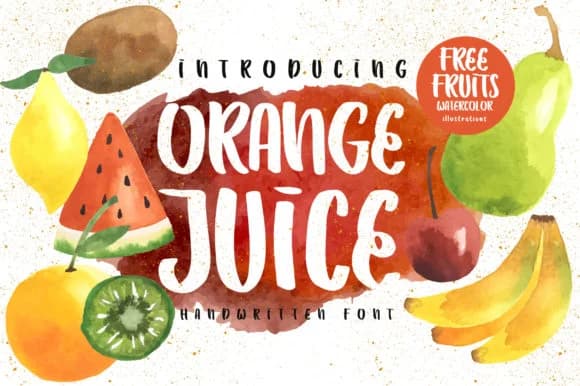
1 / 4About Orange Juice Font by Caoca Studio Font
You're designing labels for an artisanal cold-pressed juice brand, and you need a handwritten font that feels genuinely fresh and hand-drawn without looking tired or overworked. Orange Juice Font by Caoca Studio gets this balance exactly right. It's a quirky handwritten script that arrives paired with watercolor fruit illustrations, letting you layer those decorative elements directly into your layout without needing to hunt for extras.
This font works beautifully across juice bottle labels, farmers market stall signage, and organic product packaging where handmade warmth genuinely matters to customers. It performs equally well on greeting cards with food or nature themes, cafe menu headers where personality reads better than polish, illustrated recipe blog posts, and food-focused social media graphics for small food brands. The energetic, informal quality means it shines when you want warmth and character over corporate refinement or formal elegance. Because the illustrations are included, you have a complete visual system right out of the gate.
The bonus watercolor elements are the real win here, eliminating the usual scramble for complementary graphics. At display sizes, the quirky personality becomes a genuine asset, turning labels and signage into work that feels intentional and thoughtfully designed rather than generic. Get this from Creative Fabrica and start building something fresh.
Style & Use Cases
- Overall Style
- Elegant, Flowing, Orange Juice
- Use Case
- Invitations, Branding
- Ideal For
- wedding stationery, greeting cards, and signatures
- Pairs With
- a simple uppercase sans
How to Install Orange Juice Font by Caoca Studio Font
Step-by-step instructions for every platform
- 1Download the Orange Juice Font by Caoca Studio font file (.ttf or .otf).
- 2Locate the downloaded file in your Downloads folder.
- 3Right-click the font file.
- 4Select "Install" to install for the current user, or "Install for all users" to make it available system-wide.
- 5Orange Juice Font by Caoca Studio is now available in Word, Photoshop, Illustrator, and all other apps.
More by Caoca Studio
View all →

Browse fonts by theme
Curated collections →Saw a font in a picture? Identify any font from an image with our free Font Finder.
More Script Handwritten Fonts
Browse all →







What pairs well with Orange Juice Font by Caoca Studio Font?
Orange Juice Font by Caoca Studio Font is a script font that shines as a display or heading face. Pair it with a clean sans-serif or serif font for body text — the contrast creates a clear hierarchy while the two styles stay balanced and easy to read.



Orange Juice Font by Caoca Studio Font
by Caoca Studio
Reviewed by the FontBoxDL team · Updated June 2026