 Firefox
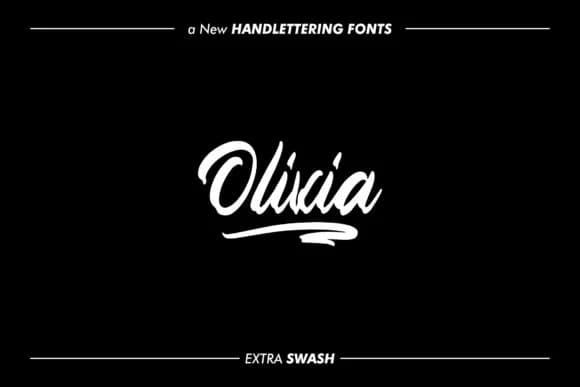 1 / 5
1 / 5About Olivia Font
Olivia Font by goodjavastudio is a script typeface that balances handwritten warmth with refined clarity. The letterforms carry a touched, aged quality that reads expensive without feeling overwrought, somewhere between calligraphy and natural pen-work. What makes this typeface stand out is how it avoids the trap of looking either too precious or too casual. Instead, it sits comfortably in that middle ground where a design feels both personal and polished. Luxury branding especially benefits from this balance, where you need personality but not chaos.
Wedding invitation suites are a natural fit, where elegance matters as much as legibility. Vintage-inspired product labels, boutique cosmetics packaging, and hand-drawn style social media graphics also showcase what this font does well. Small makers and independent brands often reach for script fonts this approachable when they want to communicate craft and quality without pretension. Because those aged strokes feel genuinely handmade, it works perfectly for brands that stake their reputation on authenticity. Swash alternates add flexibility for display work too, letting you dial up the flourish when a headline calls for it.
Grab Olivia Font on Creative Fabrica and bring this graceful, handwritten style to your next project.
Style & Use Cases
- Overall Style
- Elegant, Flowing, Olivia
- Use Case
- Invitations, Branding
- Ideal For
- wedding stationery, greeting cards, and signatures
- Pairs With
- a simple uppercase sans
How to Install Olivia Font Font
Step-by-step instructions for every platform
- 1Download the Olivia Font font file (.ttf or .otf).
- 2Locate the downloaded file in your Downloads folder.
- 3Right-click the font file.
- 4Select "Install" to install for the current user, or "Install for all users" to make it available system-wide.
- 5Olivia Font is now available in Word, Photoshop, Illustrator, and all other apps.
More by goodjavastudio
View all →

Browse fonts by theme
Curated collections →Saw a font in a picture? Identify any font from an image with our free Font Finder.
More Script Handwritten Fonts
Browse all →







What pairs well with Olivia Font?
Olivia Font is a script font that shines as a display or heading face. Pair it with a clean sans-serif or serif font for body text — the contrast creates a clear hierarchy while the two styles stay balanced and easy to read.



Olivia Font
Reviewed by the FontBoxDL team · Updated June 2026