 Firefox
 1 / 8
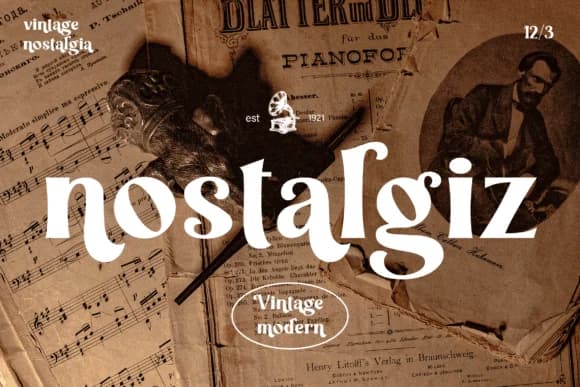
1 / 8About Nostalgiz Font
Nostalgiz, designed by Graphue, trades on weighted slab serifs and rounded curves that feel both heavy and approachable, threading a line between mid-century industrial and contemporary craft sensibility. The chunky letterforms carry visual weight without feeling dated, making room for modern applications while keeping that retro character front and center.
This font excels when you need warmth and personality in type. Boutique skincare packaging benefits from its blend of sophistication and playfulness, while wedding invitation suites gain an heirloom quality that feels intentional rather than clichéd. Etsy product labels pop with this typeface, and vintage branding projects almost naturally gravitate toward its sturdy geometry. Handmade craft signs and DIY art projects also come alive with Nostalgiz, where its slightly oversized letterforms demand attention without shouting.
The font's confidence comes partly from its substantial serifs, which anchor each character and give copy a grounded, reliable feeling. For body text or display work, this typeface holds its own. It's built for designers creating in the handmade, vintage, or nostalgic space, especially those who understand that retro appeal works best when it's mixed with clean, contemporary thinking. Grab Nostalgiz on Creative Fabrica and start experimenting.
Style & Use Cases
- Overall Style
- Sturdy, Confident, Vintage
- Use Case
- Headlines, Merch
- Ideal For
- vintage posters, logos, and product packaging
- Pairs With
- a light sans-serif
How to Install Nostalgiz Font
Step-by-step instructions for every platform
- 1Download the Nostalgiz font file (.ttf or .otf).
- 2Locate the downloaded file in your Downloads folder.
- 3Right-click the font file.
- 4Select "Install" to install for the current user, or "Install for all users" to make it available system-wide.
- 5Nostalgiz is now available in Word, Photoshop, Illustrator, and all other apps.
More by Graphue
View all →
Browse fonts by theme
Curated collections →Saw a font in a picture? Identify any font from an image with our free Font Finder.
More Slab Serif Fonts
Browse all →







What pairs well with Nostalgiz Font?
Nostalgiz Font is a slab serif font that shines as a display or heading face. Pair it with a clean sans-serif or serif font for body text — the contrast creates a clear hierarchy while the two styles stay balanced and easy to read.



Nostalgiz Font
by Graphue
Reviewed by the FontBoxDL team · Updated September 2026