 Firefox
 1 / 2
1 / 2About Nonna Font
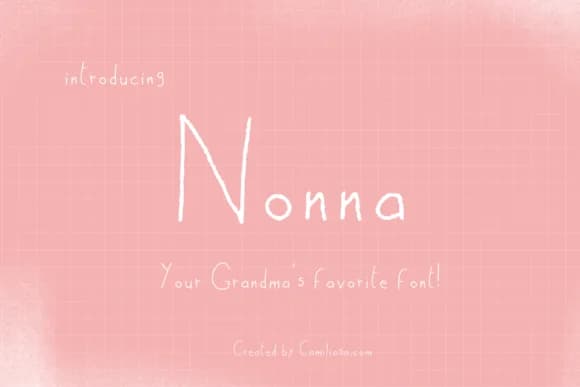
Nonna, designed by Inkclouddesign, features letterforms that feel genuinely hand-sketched while staying reliably readable throughout real applications. The strokes vary naturally, as if traced by someone working from instinct rather than a rigid grid, creating rhythm that reads as intentional rather than random. What catches your attention first is the organic flow of each letter balanced with enough consistency to function reliably across different sizes and contexts.
This script works beautifully for projects that need personality without veering into excessive sentimentality or cuteness. Wedding invitation suites gain an intimate quality that formal scripts simply can't deliver, while boutique skincare packaging looks genuinely made-by-hand in these letterforms. You'll find it equally at home with craft coffee labels, DIY welcome signs, and custom stationery designed to sit on someone's desk or shelf. The letterforms carry enough character to shine at display sizes while remaining legible in smaller applications where readability counts.
Nonna speaks directly to designers and small business owners building brands that feel handcrafted rather than mass-produced. If your work values honest communication and genuine personality over polished perfection, this typeface will serve you well. Grab it on Creative Fabrica to add that human element to your next project.
Style & Use Cases
- Overall Style
- Elegant, Flowing, Nonna
- Use Case
- Invitations, Branding
- Ideal For
- wedding stationery, greeting cards, and signatures
- Pairs With
- a simple uppercase sans
How to Install Nonna Font Font
Step-by-step instructions for every platform
- 1Download the Nonna Font font file (.ttf or .otf).
- 2Locate the downloaded file in your Downloads folder.
- 3Right-click the font file.
- 4Select "Install" to install for the current user, or "Install for all users" to make it available system-wide.
- 5Nonna Font is now available in Word, Photoshop, Illustrator, and all other apps.
More by Inkclouddesign
View all →
Browse fonts by theme
Curated collections →Saw a font in a picture? Identify any font from an image with our free Font Finder.
More Script Handwritten Fonts
Browse all →







What pairs well with Nonna Font?
Nonna Font is a script font that shines as a display or heading face. Pair it with a clean sans-serif or serif font for body text — the contrast creates a clear hierarchy while the two styles stay balanced and easy to read.



Nonna Font
Reviewed by the FontBoxDL team · Updated August 2026