 Firefox
 1 / 9
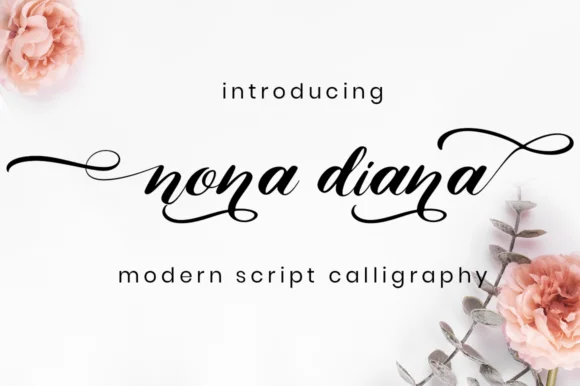
1 / 9About Nona Diana Font
Imagine laying out an upscale wedding invitation suite where elegance has to feel both refined and personal at once. Nona Diana, created by attypestudio, delivers that balance through a light, flowing script punctuated by bold, confident swashes that anchor and define each letter. It manages to be simultaneously delicate and commanding, which makes it work across contexts you might not expect from something this refined.
This script excels at luxury branding work, particularly high-end perfume labels and jewelry packaging where restraint and impact need to coexist. Wedding stationery is its strongest home, though it performs beautifully for hand-lettered greeting cards, luxury spa menus, boutique fashion tags, and invitation design more broadly. The swashes are generous enough to feel expressive without tipping into theatrical territory. That gives designers real flexibility: you can let them dominate the layout or play them down depending on what the project needs. Its light weight keeps everything from feeling heavy even when swashes overlap or interlock.
What makes Nona Diana particularly practical is how the weight and swash structure work at multiple scales. Use it bold and large for display, or dial it back for body-level text in luxury applications. It's a script with both restraint and personality, something many designers hunt for. Add Nona Diana to your typeface library via Creative Fabrica and you'll have a luxury script ready when the right project lands.
Style & Use Cases
- Overall Style
- Elegant, Flowing, Script
- Use Case
- Invitations, Branding
- Ideal For
- wedding stationery, greeting cards, and signatures
- Pairs With
- a simple uppercase sans
How to Install Nona Diana Font Font
Step-by-step instructions for every platform
- 1Download the Nona Diana Font font file (.ttf or .otf).
- 2Locate the downloaded file in your Downloads folder.
- 3Right-click the font file.
- 4Select "Install" to install for the current user, or "Install for all users" to make it available system-wide.
- 5Nona Diana Font is now available in Word, Photoshop, Illustrator, and all other apps.
More by attypestudio
View all →

Browse fonts by theme
Curated collections →Saw a font in a picture? Identify any font from an image with our free Font Finder.
More Script Handwritten Fonts
Browse all →







What pairs well with Nona Diana Font?
Nona Diana Font is a script font that shines as a display or heading face. Pair it with a clean sans-serif or serif font for body text — the contrast creates a clear hierarchy while the two styles stay balanced and easy to read.




Nona Diana Font
by attypestudio
Reviewed by the FontBoxDL team · Updated August 2026