 Firefox
 1 / 8
1 / 8About Noirda Font
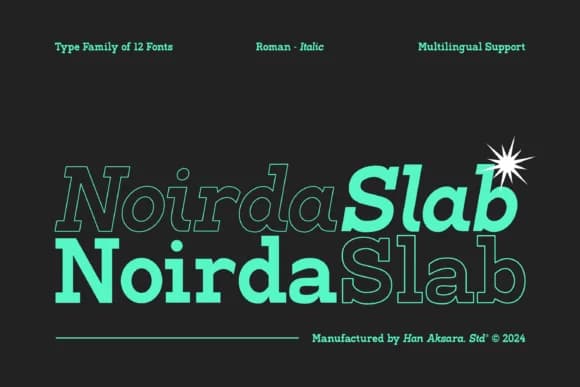
Noirda by Hanaksara Studio is a bold slab serif that straddles classic and contemporary design with genuine authority. The font carries the weight and presence of traditional slab forms, but applies a distinctly modern sensibility that makes it equally at home on a brutalist poster, strengthening brand logotypes, or framing an editorial spread. That balance between inherited tradition and current design thinking is exactly where it earns its place in a serious designer's toolkit.
The typeface ships with six weights, ranging from Light to Extra Bold, and each comes paired with its own italic companion. This range gives you the flexibility you need across different design applications. Magazine mastheads and editorial headers tap into its assertive character quite naturally, while restaurant branding, book covers, and premium packaging all wear its distinctive serif strength without tipping into nostalgia. Readability stays solid even at smaller sizes, with letterforms that hold their legibility and presence across all contexts, which matters especially when you're setting body text or fitting type into tight design constraints.
If you need a slab serif with real backbone that doesn't feel historically trapped, Noirda is built for your collection. Find it on Creative Fabrica and put it to work.
Style & Use Cases
- Overall Style
- Sturdy, Confident, Slab Serif
- Use Case
- Headlines, Merch
- Ideal For
- vintage posters, logos, and product packaging
- Pairs With
- a light sans-serif
How to Install Noirda Font
Step-by-step instructions for every platform
- 1Download the Noirda font file (.ttf or .otf).
- 2Locate the downloaded file in your Downloads folder.
- 3Right-click the font file.
- 4Select "Install" to install for the current user, or "Install for all users" to make it available system-wide.
- 5Noirda is now available in Word, Photoshop, Illustrator, and all other apps.
More by Hanaksara Studio
View all →
Browse fonts by theme
Curated collections →Saw a font in a picture? Identify any font from an image with our free Font Finder.
More Slab Serif Fonts
Browse all →







What pairs well with Noirda Font?
Noirda Font is a slab serif font that shines as a display or heading face. Pair it with a clean sans-serif or serif font for body text — the contrast creates a clear hierarchy while the two styles stay balanced and easy to read.



Noirda Font
Reviewed by the FontBoxDL team · Updated August 2026