
 1 / 5
1 / 5About NewLibrary Font
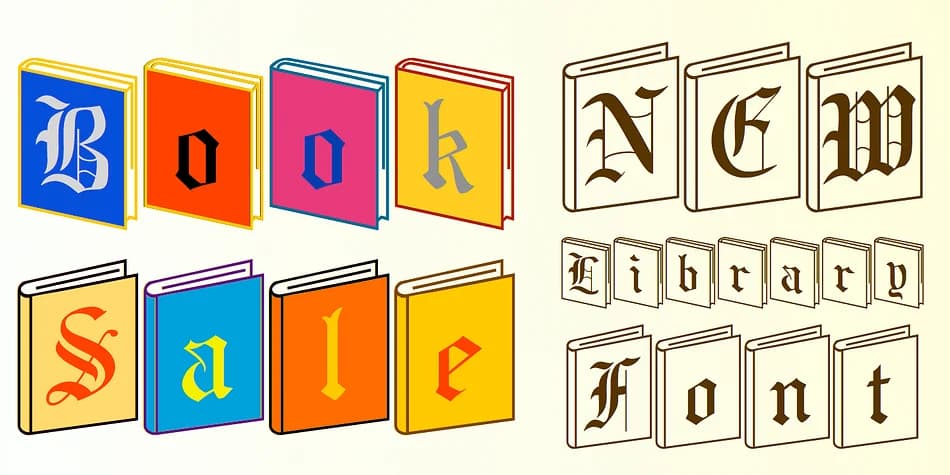
A graphic designer working on a publisher's anniversary campaign wants type that actually incorporates books into the letterforms themselves, not just book-themed styling. NewLibrary, crafted by Ingrimayne Type, delivers exactly this: a blackletter font where the letters are literally constructed from stacked book pages and spines. Built on the foundation of BeneScriptine, it reimagines what letterforms can be when books become the building blocks, creating something both decorative and conceptually layered.
The font finds its best use in bookish applications: vintage library branding, independent publisher logos, literary magazine mastheads, coffee table book covers, or book club event graphics and invitations. Its real strength lies in the built-in layering system. NewLibrary includes both solid and outlined book-character versions for each letter, which opens up genuine color possibilities without having to create multiple typeface variations. Included documentation walks you through how to stack these versions or use zero-width characters to build sophisticated multi-color effects without relying on tedious separate design steps or complicated production workflows.
For screen printing, stationery design, or setting decorative headlines in book-focused brands, the solid and outlined alternates give you real flexibility in how you execute the type. This isn't mere decoration with a book motif. Get NewLibrary on Creative Fabrica.
Style & Use Cases
- Overall Style
- Ornate, Gothic
- Use Case
- Logos, Certificates
- Ideal For
- medieval themes, band merch, and tattoo lettering
- Pairs With
- a clean sans-serif for body text
How to Install NewLibrary Font
Step-by-step instructions for every platform
- 1Download the NewLibrary font file (.ttf or .otf).
- 2Locate the downloaded file in your Downloads folder.
- 3Right-click the font file.
- 4Select "Install" to install for the current user, or "Install for all users" to make it available system-wide.
- 5NewLibrary is now available in Word, Photoshop, Illustrator, and all other apps.
More by Ingrimayne Type
View all →


Browse fonts by theme
Curated collections →Saw a font in a picture? Identify any font from an image with our free Font Finder.
More Blackletter Fonts
Browse all →







What pairs well with NewLibrary Font?
NewLibrary Font is a blackletter font that shines as a display or heading face. Pair it with a clean serif or sans-serif font for body text — the contrast creates a clear hierarchy while the two styles stay balanced and easy to read.



NewLibrary Font
Reviewed by the FontBoxDL team · Updated June 2026