 Firefox
 1 / 5
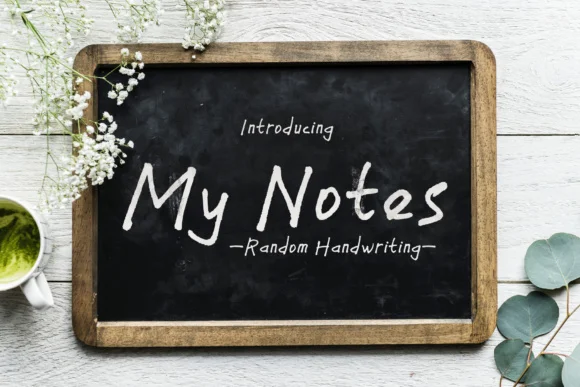
1 / 5About My Notes Font
My Notes Font by Atjcloth Studio is a handwritten script that brings authentic, pen-on-paper character to contemporary design. With both uppercase and lowercase letters individually sketched, this typeface captures the relaxed quality of genuine handwriting while maintaining the legibility and consistency professional work requires.
This script excels across applications where personality and human touch strengthen design. Wedding invitation suites gain from the personal connection this font delivers, while greeting card layouts benefit from its handwritten warmth. Custom stationery packages and personalized gift tags showcase the typeface's genuine character, and modern brand identity systems increasingly employ handwritten scripts to signal approachability and craft heritage. Designers also select scripts like this for logo wordmarks, event signage, and artisanal product packaging where handmade aesthetics build brand trust and perceived quality.
The subtle variation in letter forms gives My Notes Font the living quality of original handwriting while providing the consistency that professional work demands. Whether designing complete stationery systems or individual pieces that need genuine warmth, this typeface strikes the right balance between artistic expression and functional clarity. Find My Notes Font on Creative Fabrica and discover how handwritten authenticity can strengthen your next design project.
Style & Use Cases
- Overall Style
- Elegant, Flowing, My Notes
- Use Case
- Invitations, Branding
- Ideal For
- wedding stationery, greeting cards, and signatures
- Pairs With
- a simple uppercase sans
How to Install My Notes Font Font
Step-by-step instructions for every platform
- 1Download the My Notes Font font file (.ttf or .otf).
- 2Locate the downloaded file in your Downloads folder.
- 3Right-click the font file.
- 4Select "Install" to install for the current user, or "Install for all users" to make it available system-wide.
- 5My Notes Font is now available in Word, Photoshop, Illustrator, and all other apps.
More by Atjcloth Studio
View all →

Browse fonts by theme
Curated collections →Saw a font in a picture? Identify any font from an image with our free Font Finder.
More Script Handwritten Fonts
Browse all →







What pairs well with My Notes Font?
My Notes Font is a script font that shines as a display or heading face. Pair it with a clean sans-serif or serif font for body text — the contrast creates a clear hierarchy while the two styles stay balanced and easy to read.




My Notes Font
Reviewed by the FontBoxDL team · Updated May 2026