 Firefox
 1 / 9
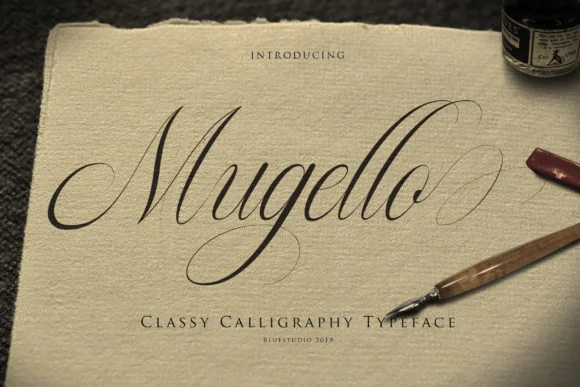
1 / 9About Mugello Font
Mugello by Bluestudio is a handwritten script rooted in classic calligraphy, bringing the personal warmth that matters most in designs built on authenticity and craft. The flowing letterforms capture the soul of hand lettering without the time, cost, or learning curve of commissioning a proper calligrapher, making sophisticated script typography accessible to designers at any skill level.
Wedding invitation suites gain immediate credibility from letterforms this graceful, as do custom stationery sets that make people actually want to pull them out of a drawer and use them. Boutique skincare packaging, restaurant menu cards, and branded gift boxes all rely on the quiet confidence that handwritten scripts bring to luxury brand experiences. A mass-market typeface might feel impersonal or corporate by comparison, but Mugello brings intention and care to every application it touches, adding the kind of depth that standard fonts simply cannot match.
Pair it with clean, minimal layouts for contemporary elegance, or layer it into something richer and more ornate for traditional visual impact. The typeface works across different mediums and design contexts. You'll find yourself reaching for it again and again. Pick up Mugello on Creative Fabrica and see how the right script transforms a design from purely functional into something memorable.
Style & Use Cases
- Overall Style
- Elegant, Flowing, Mugello
- Use Case
- Invitations, Branding
- Ideal For
- wedding stationery, greeting cards, and signatures
- Pairs With
- a simple uppercase sans
How to Install Mugello Font Font
Step-by-step instructions for every platform
- 1Download the Mugello Font font file (.ttf or .otf).
- 2Locate the downloaded file in your Downloads folder.
- 3Right-click the font file.
- 4Select "Install" to install for the current user, or "Install for all users" to make it available system-wide.
- 5Mugello Font is now available in Word, Photoshop, Illustrator, and all other apps.
More by Bluestudio
View all →
Browse fonts by theme
Curated collections →Saw a font in a picture? Identify any font from an image with our free Font Finder.
More Script Handwritten Fonts
Browse all →







What pairs well with Mugello Font?
Mugello Font is a script font that shines as a display or heading face. Pair it with a clean sans-serif or serif font for body text — the contrast creates a clear hierarchy while the two styles stay balanced and easy to read.




Mugello Font
by Bluestudio
Reviewed by the FontBoxDL team · Updated June 2026