 Firefox
 1 / 9
1 / 9About Mountiza Font
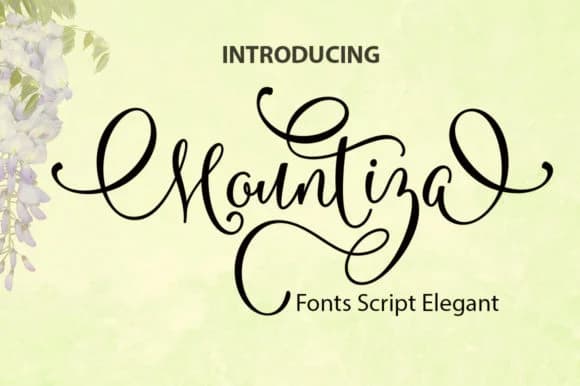
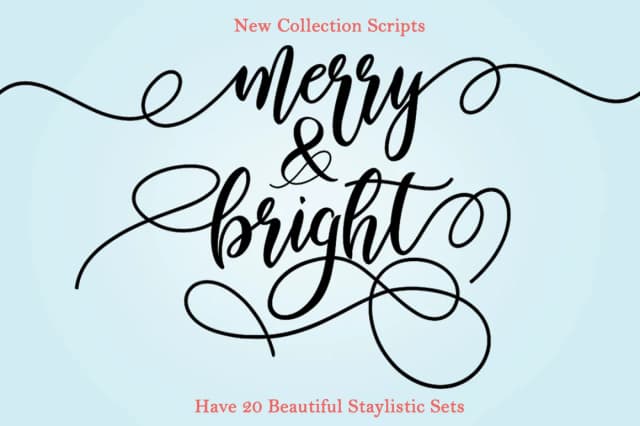
There's a playful, approachable warmth to a script that feels like it came straight from someone's personal sketchbook. Mountiza, designed by YanIndesign, captures that feeling with its whimsical handwritten style that somehow manages to stay readable even as it dances across the page with character and flair.
What makes this font work so well is its balance between personality and practicality. The curves feel natural and organic without being overwrought or hard to follow, which opens doors for all kinds of projects. Think hand-lettered wedding invitation suites, personalized greeting card designs, boutique skincare product labels, and decorative menu cards for independent cafes and bakeries looking for that authentic handmade touch. The character set covers English and common accented languages, so you won't run into missing glyph problems when moving between different projects or clients.
The key to using a script like this well is pairing it with something clear and minimal for visual contrast. A clean sans-serif for your body copy creates the balance that lets both fonts do their best work instead of competing with each other on the page. You'll find Mountiza on Creative Fabrica ready to bring some genuine personality and warmth to your next design project.
Style & Use Cases
- Overall Style
- Elegant, Flowing, Mountiza
- Use Case
- Invitations, Branding
- Ideal For
- wedding stationery, greeting cards, and signatures
- Pairs With
- a simple uppercase sans
How to Install Mountiza Font Font
Step-by-step instructions for every platform
- 1Download the Mountiza Font font file (.ttf or .otf).
- 2Locate the downloaded file in your Downloads folder.
- 3Right-click the font file.
- 4Select "Install" to install for the current user, or "Install for all users" to make it available system-wide.
- 5Mountiza Font is now available in Word, Photoshop, Illustrator, and all other apps.
More by YanIndesign
View all →
Browse fonts by theme
Curated collections →Saw a font in a picture? Identify any font from an image with our free Font Finder.
More Script Handwritten Fonts
Browse all →







What pairs well with Mountiza Font?
Mountiza Font is a script font that shines as a display or heading face. Pair it with a clean sans-serif or serif font for body text — the contrast creates a clear hierarchy while the two styles stay balanced and easy to read.



Mountiza Font
by YanIndesign
Reviewed by the FontBoxDL team · Updated June 2026