 Firefox
 1 / 8
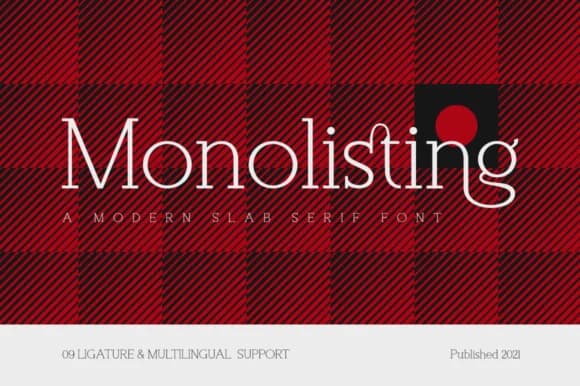
1 / 8About Monolisting Font
Monolisting by RockboyStudio is a minimal slab serif built on geometric principles that manage to feel contemporary without chasing trends. It carries genuine weight for headlines while maintaining strong readability, making it an excellent choice for magazine mastheads and editorial layouts where visual clarity matters most. Clean proportions work particularly well across branding applications: luxury product logos, sports equipment labeling and signage, photography captions, and design work where restraint signals confidence rather than hesitation.
What makes this font distinctive is its balance between editorial polish and approachable warmth, a quality rarely found in modern slab serifs. Think coffee table book jackets, business cards for creative studios, adventure photography headers, and fashion editorial spreads, each gaining dimension with its geometric simplicity. You'll see it perform beautifully and equally well as a website header for a beauty brand or supporting text on boutique product packaging. The typeface doesn't demand attention through novelty but earns it through thoughtful proportions and consistent character. RockboyStudio understood something fundamental: a useful typeface doesn't need to solve every design problem or work everywhere, it just needs to work brilliantly where it belongs. Find Monolisting on Creative Fabrica and see how it brings quiet authority and clarity to your work.
Style & Use Cases
- Overall Style
- Sturdy, Confident, Slab
- Use Case
- Headlines, Merch
- Ideal For
- vintage posters, logos, and product packaging
- Pairs With
- a light sans-serif
How to Install Monolisting Font
Step-by-step instructions for every platform
- 1Download the Monolisting font file (.ttf or .otf).
- 2Locate the downloaded file in your Downloads folder.
- 3Right-click the font file.
- 4Select "Install" to install for the current user, or "Install for all users" to make it available system-wide.
- 5Monolisting is now available in Word, Photoshop, Illustrator, and all other apps.
More by RockboyStudio
View all →

Browse fonts by theme
Curated collections →Saw a font in a picture? Identify any font from an image with our free Font Finder.
More Slab Serif Fonts
Browse all →







What pairs well with Monolisting Font?
Monolisting Font is a slab serif font that shines as a display or heading face. Pair it with a clean sans-serif or serif font for body text — the contrast creates a clear hierarchy while the two styles stay balanced and easy to read.



Monolisting Font
Reviewed by the FontBoxDL team · Updated September 2026