 Firefox
 1 / 3
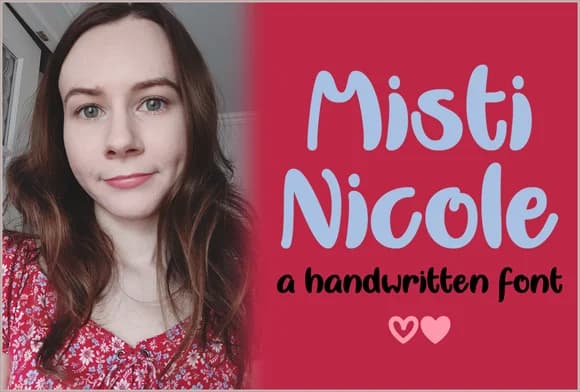
1 / 3About Misti Nicole Font
Misti Nicole's bold letterforms capture the energy of hand-drawn lettering without sacrificing legibility. Designer Misti crafted this typeface to bring genuine personality to projects that demand character over polish. The confident strokes and loose, organic feel make every word feel personally written, creating an immediate sense of warmth and intention that pure geometric typefaces simply cannot match.
This script performs beautifully across physical and digital applications. Wedding invitation suites gain intimacy when set in Misti Nicole, while small-batch product labels and boutique skincare packaging benefit from its approachable boldness. Etsy sellers find it ideal for shop branding, and DIY craft sign makers appreciate how readable it stays at different sizes. The handlettered quality adds visual interest without requiring decorative embellishment, so it pairs well with imagery and stands strong on its own.
Creative professionals building brands around handmade aesthetics and intentional design naturally gravitate toward this typeface. Custom stationery suites, illustrated recipe cards, hand-drawn logo treatments, and greeting card designs all benefit from its distinctive voice. This typeface delivers the consistency of professional type design with the soul of personal handwriting. Head to Creative Fabrica to add this bold script to your toolkit and see how it transforms your next branding project.
Style & Use Cases
- Overall Style
- Elegant, Flowing, Misti Nicole
- Use Case
- Invitations, Branding
- Ideal For
- wedding stationery, greeting cards, and signatures
- Pairs With
- a simple uppercase sans
How to Install Misti Nicole Font Font
Step-by-step instructions for every platform
- 1Download the Misti Nicole Font font file (.ttf or .otf).
- 2Locate the downloaded file in your Downloads folder.
- 3Right-click the font file.
- 4Select "Install" to install for the current user, or "Install for all users" to make it available system-wide.
- 5Misti Nicole Font is now available in Word, Photoshop, Illustrator, and all other apps.
More by Misti
View all →

Browse fonts by theme
Curated collections →Saw a font in a picture? Identify any font from an image with our free Font Finder.
More Script Handwritten Fonts
Browse all →







What pairs well with Misti Nicole Font?
Misti Nicole Font is a script font that shines as a display or heading face. Pair it with a clean sans-serif or serif font for body text — the contrast creates a clear hierarchy while the two styles stay balanced and easy to read.



Misti Nicole Font
by Misti
Reviewed by the FontBoxDL team · Updated August 2026