 Firefox
 1 / 3
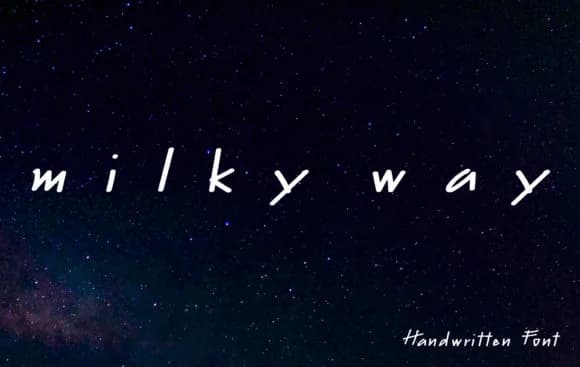
1 / 3About Milky Way Font
There's something effortless and inviting about this typeface. Milky Way Font by SkyClick captures that flowing, cosmic ease in a smooth script that feels both accessible and modern. The letters move with a natural rhythm, making it equally at home on handwritten wedding invitation suites, thank you cards, custom fabric labels for small businesses, greeting card designs, nursery wall art, or social media story graphics where personality matters more than perfection. The casual warmth means it won't feel stiff or overly formal, which opens up design possibilities well beyond the usual suspects.
This script breathes across the page for gift tags, wedding stationery collections, cosmetics packaging, personalized product labels, and envelope addressing. The smooth execution keeps it modern enough that it won't date quickly, even as you apply it across seasonal collections and long-term branding projects. You'll find it works especially well when you want that handwritten feel without sacrificing readability, which matters for smaller print sizes and detailed work. Pair Milky Way with a clean, minimal sans-serif for body text when building something longer-form, as the script's fluidity really shines when given breathing room and contrast. Find it on Creative Fabrica and add it to your working font library.
Style & Use Cases
- Overall Style
- Elegant, Flowing
- Use Case
- Invitations, Branding
- Ideal For
- wedding stationery, greeting cards, and signatures
- Pairs With
- a simple uppercase sans
How to Install Milky Way Font Font
Step-by-step instructions for every platform
- 1Download the Milky Way Font font file (.ttf or .otf).
- 2Locate the downloaded file in your Downloads folder.
- 3Right-click the font file.
- 4Select "Install" to install for the current user, or "Install for all users" to make it available system-wide.
- 5Milky Way Font is now available in Word, Photoshop, Illustrator, and all other apps.
More by SkyClick
View all →


Browse fonts by theme
Curated collections →Saw a font in a picture? Identify any font from an image with our free Font Finder.
More Script Handwritten Fonts
Browse all →







What pairs well with Milky Way Font?
Milky Way Font is a script font that shines as a display or heading face. Pair it with a clean sans-serif or serif font for body text — the contrast creates a clear hierarchy while the two styles stay balanced and easy to read.



Milky Way Font
by SkyClick
Reviewed by the FontBoxDL team · Updated September 2026