 Firefox
 1 / 8
1 / 8Loading font…
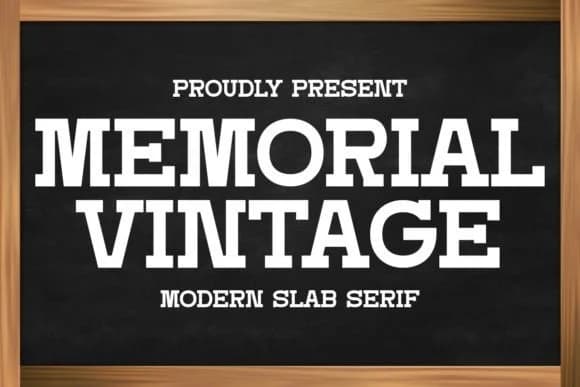
About Memorial Vintage Font
Memorial Vintage by Intype Studio is a slab serif that bridges authentic vintage character with modern clarity and restraint. The typeface carries substantial weight across every letterform while staying remarkably readable at various scales, whether you're setting it small in body text or amplifying it as commanding headlines. Its structured geometry gives the design an immediate sense of authority and confidence without veering into heavy-handedness.
This font excels in tactile, handmade contexts. Coffee mug designs and custom drinkware gain real warmth from its personality, vintage band merchandise receives exactly the impact and gravitas it needs, and retro apparel branding feels assured rather than indulgent. Wedding invitation suites develop a genuinely timeless quality, handmade award certificates look deliberate and intentional rather than generic, and Etsy product labels for boutique skincare or artisanal packaging feel thoughtfully specific. Backgrounds and overlays benefit from the consistent clarity of each character, which prevents even dense layouts from feeling overcrowded or chaotic.
Beyond those core applications, the structured letterforms adapt equally well to headlines and supporting text, making it a versatile addition to any designer's toolkit. The typeface balances nostalgia with contemporary restraint in a way that feels both grounded and fresh. Pick up Memorial Vintage on Creative Fabrica.
Style & Use Cases
- Overall Style
- Sturdy, Confident, Vintage Font
- Use Case
- Headlines, Merch
- Ideal For
- vintage posters, logos, and product packaging
- Pairs With
- a light sans-serif
How to Install Memorial Vintage Font
Step-by-step instructions for every platform
- 1Download the Memorial Vintage font file (.ttf or .otf).
- 2Locate the downloaded file in your Downloads folder.
- 3Right-click the font file.
- 4Select "Install" to install for the current user, or "Install for all users" to make it available system-wide.
- 5Memorial Vintage is now available in Word, Photoshop, Illustrator, and all other apps.
More by Intype Studio
View all →
Browse fonts by theme
Curated collections →Saw a font in a picture? Identify any font from an image with our free Font Finder.
More Slab Serif Fonts
Browse all →







What pairs well with Memorial Vintage Font?
Memorial Vintage Font is a slab serif font that shines as a display or heading face. Pair it with a clean sans-serif or serif font for body text — the contrast creates a clear hierarchy while the two styles stay balanced and easy to read.



Memorial Vintage Font
Reviewed by the FontBoxDL team · Updated October 2026