 Firefox
 1 / 8
1 / 8About Mefika Font
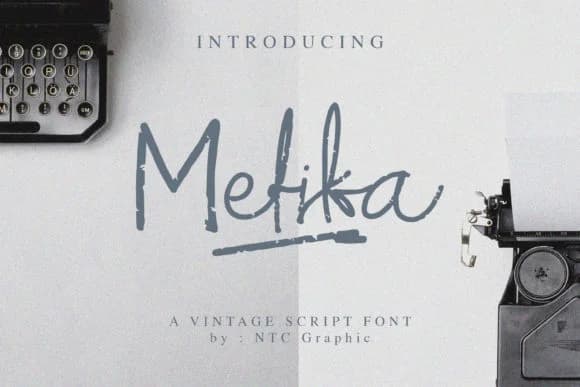
This handwritten script brings a lighthearted, retro energy to any layout. Mefika, designed by dwiskrisdiantoro9, is a script with real character and movement that nods to vintage aesthetics without feeling overwrought or nostalgic for its own sake. The letterforms have a sketchy confidence to them, loose enough to feel genuinely human but structured enough to maintain legibility at various sizes.
The font shines in applications where personality matters more than formal polish. Think wedding invitation suites where you want guests to feel the designer's hand in every detail, Etsy product labels for handmade goods, boutique packaging for skincare or artisan products, and DIY craft signage where imperfection becomes visual charm. The included swashes give you extra flourish when you want to emphasize a single word or create visual interest in headers without forcing you to overuse ornament. This flexibility makes it a useful script that adapts to different design moments.
Pair Mefika with a clean, contemporary sans-serif for any body copy that needs to run beyond a single line. This pairing keeps readability strong while letting the script do the heavy lifting as your design's focal point. You'll find it on Creative Fabrica, ready to bring that hand-drawn quality to your next project.
Style & Use Cases
- Overall Style
- Elegant, Flowing, Mefika
- Use Case
- Invitations, Branding
- Ideal For
- wedding stationery, greeting cards, and signatures
- Pairs With
- a simple uppercase sans
How to Install Mefika Font Font
Step-by-step instructions for every platform
- 1Download the Mefika Font font file (.ttf or .otf).
- 2Locate the downloaded file in your Downloads folder.
- 3Right-click the font file.
- 4Select "Install" to install for the current user, or "Install for all users" to make it available system-wide.
- 5Mefika Font is now available in Word, Photoshop, Illustrator, and all other apps.
More by dwikrisdiantoro9
View all →

Browse fonts by theme
Curated collections →Saw a font in a picture? Identify any font from an image with our free Font Finder.
More Script Handwritten Fonts
Browse all →







What pairs well with Mefika Font?
Mefika Font is a script font that shines as a display or heading face. Pair it with a clean sans-serif or serif font for body text — the contrast creates a clear hierarchy while the two styles stay balanced and easy to read.



Mefika Font
Reviewed by the FontBoxDL team · Updated August 2026