
 1 / 5
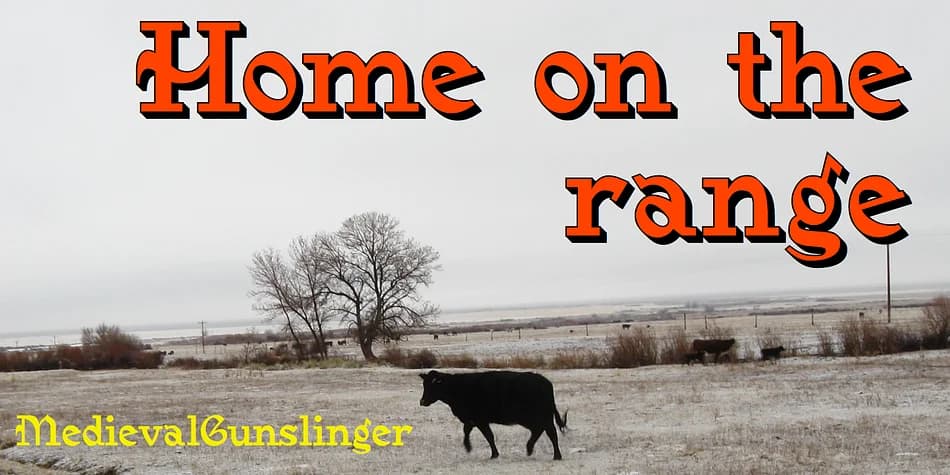
1 / 5About Medieval Gunslinger Font
Medieval Gunslinger splits the difference between industrial precision and ornamental complexity. Designed by Ingrimayne Type, this blackletter font takes the squared-off geometry of 19th century industrial faces and drapes them in medieval and calligraphic flourishes. The letters feel simultaneously rough-hewn and intricate, with enough blocky weight to read at a glance but enough decoration to hold visual attention at display sizes. This is a typeface with real character: sturdy enough for headlines, ornate enough for something that needs to feel authentic.
The layering system is the standout technical feature. Medieval Gunslinger Shadow Overlay aligns with Medieval Gunslinger Shadow to create two-color lettering effects without trial and error. That capability opens up specific opportunities: vintage whiskey labels where you want faded printed layers, metal band merchandise with that hand-distressed look, gothic wedding invitations that feel genuinely period-appropriate, or antique shop signage that convinces customers the place is genuinely old. You get clean, predictable results every time you stack them.
This font works best for projects that can carry real visual weight and don't need subtlety. Print it or set it on screen, and the letterforms stay legible and punchy beneath all that detail. Grab the full family on Creative Fabrica for download and commercial use.
Style & Use Cases
- Overall Style
- Ornate, Gothic
- Use Case
- Logos, Certificates
- Ideal For
- medieval themes, band merch, and tattoo lettering
- Pairs With
- a clean sans-serif for body text
How to Install Medieval Gunslinger Font
Step-by-step instructions for every platform
- 1Download the Medieval Gunslinger font file (.ttf or .otf).
- 2Locate the downloaded file in your Downloads folder.
- 3Right-click the font file.
- 4Select "Install" to install for the current user, or "Install for all users" to make it available system-wide.
- 5Medieval Gunslinger is now available in Word, Photoshop, Illustrator, and all other apps.
More by Ingrimayne Type
View all →

Browse fonts by theme
Curated collections →Saw a font in a picture? Identify any font from an image with our free Font Finder.
More Blackletter Fonts
Browse all →







What pairs well with Medieval Gunslinger Font?
Medieval Gunslinger Font is a blackletter font that shines as a display or heading face. Pair it with a clean serif or sans-serif font for body text — the contrast creates a clear hierarchy while the two styles stay balanced and easy to read.



Medieval Gunslinger Font
Reviewed by the FontBoxDL team · Updated June 2026