 Firefox
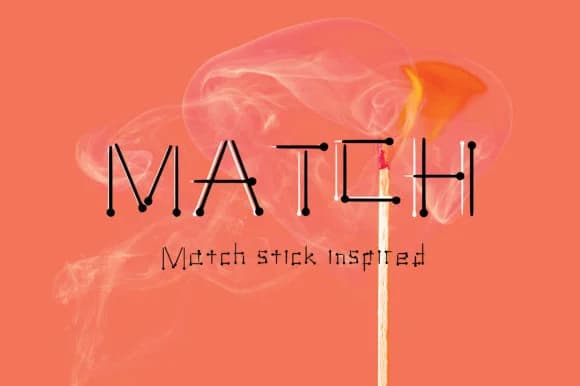 1 / 3
1 / 3About Match Font
Match Font's letterforms are built around the simple, bold geometry of matchsticks, creating a distinctive visual rhythm that feels both playfully modern and genuinely handmade. Designed by GraphicsBam Fonts, this script typeface balances casual charm with intentional construction, making it visually engaging without sacrificing legibility even at smaller sizes.
The font comes in two weights (regular and bold), which means you can control emphasis across your designs. It's particularly useful for children's birthday invitation suites, handmade greeting cards, custom sticker sheets, playroom wall signage, and DIY craft labels that need to feel approachable rather than polished. The buoyant letterforms also work beautifully in scrapbooking layouts, artisan product tags, and hand-lettered poster designs where warmth matters more than formality. Because it leans into a youthful sensibility without becoming childish, Match succeeds in branding contexts where you want to signal friendliness and authenticity.
Match Font is ideal for designers and makers who are crafting work for young audiences or projects that demand genuine personality and real warmth. The typeface avoids the slick, over-designed feel that often makes playful fonts feel inauthentic or contrived. Find it on Creative Fabrica and start building designs that truly convey character and a touch of handmade charm.
Style & Use Cases
- Overall Style
- Elegant, Flowing, Fancy
- Use Case
- Invitations, Branding
- Ideal For
- wedding stationery, greeting cards, and signatures
- Pairs With
- a simple uppercase sans
How to Install Match Font Font
Step-by-step instructions for every platform
- 1Download the Match Font font file (.ttf or .otf).
- 2Locate the downloaded file in your Downloads folder.
- 3Right-click the font file.
- 4Select "Install" to install for the current user, or "Install for all users" to make it available system-wide.
- 5Match Font is now available in Word, Photoshop, Illustrator, and all other apps.
More by GraphicsBam Fonts
View all →
Browse fonts by theme
Curated collections →Saw a font in a picture? Identify any font from an image with our free Font Finder.
More Script Handwritten Fonts
Browse all →







What pairs well with Match Font?
Match Font is a script font that shines as a display or heading face. Pair it with a clean sans-serif or serif font for body text — the contrast creates a clear hierarchy while the two styles stay balanced and easy to read.



Match Font
Reviewed by the FontBoxDL team · Updated June 2026