
 1 / 5
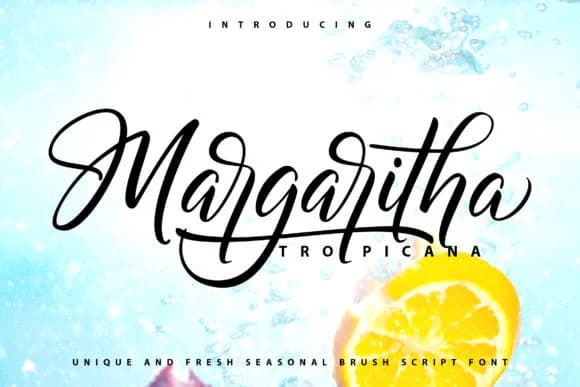
1 / 5About Margaritha Tropicana Font
There's something warm and energetic about this script typeface. Margaritha Tropicana, designed by Vunira, captures boldly drawn letterforms that bring character and authenticity without sacrificing polish. This makes it an excellent choice for projects that demand both personality and refinement.
The font shines across a range of professional and personal applications. Wedding invitation suites are a natural home for it, especially where you want the typography to feel personal rather than templated. It works equally well for tropical resort branding and boutique hospitality identities that need to convey luxury with a warm, approachable tone. You can also put it to work on artisan product labels, Etsy packaging graphics, and custom signage for everything from botanical skincare brands to handcrafted goods. The letters have enough presence to carry a design but enough finesse to feel refined rather than casual or childish.
If you want to use Margaritha Tropicana as a display face, a simple, clean sans-serif in body text will create a nice balance and ensure readability where it matters. The pairing lets the script do what it does best: capture attention and set the tone. Pick it up from Creative Fabrica and start working it into your next project where warmth and sophistication both have a role to play.
Style & Use Cases
- Overall Style
- Elegant, Flowing, Margaritha Tropicana
- Use Case
- Invitations, Branding
- Ideal For
- wedding stationery, greeting cards, and signatures
- Pairs With
- a simple uppercase sans
How to Install Margaritha Tropicana Font Font
Step-by-step instructions for every platform
- 1Download the Margaritha Tropicana Font font file (.ttf or .otf).
- 2Locate the downloaded file in your Downloads folder.
- 3Right-click the font file.
- 4Select "Install" to install for the current user, or "Install for all users" to make it available system-wide.
- 5Margaritha Tropicana Font is now available in Word, Photoshop, Illustrator, and all other apps.
Browse fonts by theme
Curated collections →Saw a font in a picture? Identify any font from an image with our free Font Finder.
More Script Handwritten Fonts
Browse all →







What pairs well with Margaritha Tropicana Font?
Margaritha Tropicana Font is a script font that shines as a display or heading face. Pair it with a clean sans-serif or serif font for body text — the contrast creates a clear hierarchy while the two styles stay balanced and easy to read.



Margaritha Tropicana Font
by Vunira
Reviewed by the FontBoxDL team · Updated September 2026