 Firefox
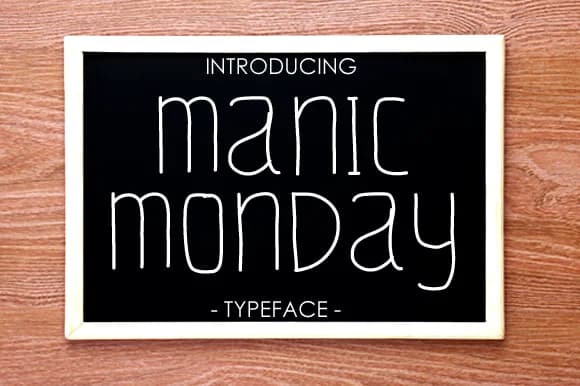
About Manic Monday Font
Manic Monday by yh.seaofknowledge is a geometric script with distinctive squared letterforms that brings contemporary personality to any typographic project. The font's lean proportions and slightly geometric character create a modern alternative to traditional handwritten styles, making it particularly appealing to designers seeking fresh visual interest without sacrificing readability or sophisticated restraint.
This typeface excels across various creative applications. It shines for creating eye-catching social media graphics, crafting custom greeting card designs, and developing minimalist event invitations where authentic artistic personality genuinely enhances the message. Its clean, modern aesthetic translates beautifully to handmade product branding initiatives and personalized stationery projects, allowing independent creators and small businesses to add distinctive character to their packaging, labels, and direct customer communications without visual clutter.
The thin weight provides consistent legibility across both digital and print formats, offering practical flexibility in how you deploy the typeface across different contexts. Whether you're designing modern blog headers, building a boutique fashion brand identity, assembling DIY invitation suites with contemporary flair, or creating custom logo treatments and brand marks, Manic Monday delivers the understated edge that clearly distinguishes professional work from standard template solutions. Bring modern sensibility to your next creative project with Manic Monday from Creative Fabrica.
Style & Use Cases
- Overall Style
- Elegant, Flowing, Manic Monday
- Use Case
- Invitations, Branding
- Ideal For
- wedding stationery, greeting cards, and signatures
- Pairs With
- a simple uppercase sans
How to Install Manic Monday Font Font
Step-by-step instructions for every platform
- 1Download the Manic Monday Font font file (.ttf or .otf).
- 2Locate the downloaded file in your Downloads folder.
- 3Right-click the font file.
- 4Select "Install" to install for the current user, or "Install for all users" to make it available system-wide.
- 5Manic Monday Font is now available in Word, Photoshop, Illustrator, and all other apps.
More by yh.seaofknowledge
View all →
Browse fonts by theme
Curated collections →Saw a font in a picture? Identify any font from an image with our free Font Finder.
More Script Handwritten Fonts
Browse all →







What pairs well with Manic Monday Font?
Manic Monday Font is a script font that shines as a display or heading face. Pair it with a clean sans-serif or serif font for body text — the contrast creates a clear hierarchy while the two styles stay balanced and easy to read.



Manic Monday Font
Reviewed by the FontBoxDL team · Updated May 2026