Firefox
 1 / 3
1 / 3Loading font…
About Ludi Font
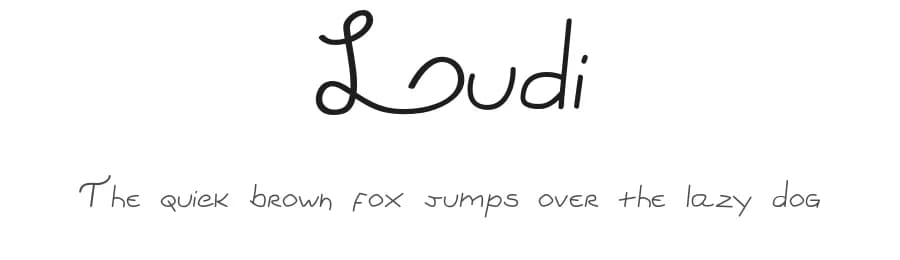
Ludi is a handwritten script font designed by Rodolfo Santos, offering casual, personal character to your design work. With 57 glyphs and support for 89+ Latin-based languages, this script provides accessible letterforms for designers working internationally while maintaining genuine handwritten appeal.
The flowing, sketch-like letterforms of Ludi excel in projects that benefit from a human touch. Wedding invitations, greeting card suites, and announcement designs gain warmth from its informal style. Crafters frequently choose Ludi for Etsy shop banners and product packaging labels that compete for attention through personality rather than formality. Social media graphics, hand-lettered quote designs, and personalized stationery rounds out the use cases where script fonts truly shine. The regular weight delivers solid readability across these applications without sacrificing the organic, brushed quality that makes handwritten script compelling.
What makes Ludi work across such varied applications is its balance between legibility and character. The letterforms remain clear enough for body text in short applications, yet expressive enough to command attention as a headline or accent. When building layouts that feature Ludi, consider pairing it with a neutral sans-serif for body copy to create visual contrast and ensure readability for longer passages. This font is available as a free download from this page, with specific license terms detailed there.
Style & Use Cases
- Overall Style
- Elegant, Flowing, Script
- Use Case
- Invitations, Branding
- Ideal For
- wedding stationery, greeting cards, and signatures
- Pairs With
- a simple uppercase sans
Similar Fonts
Fonts that look visually alike — matched by our Font Finder model.





Ludi Specifications
| Font Family | Ludi v1.0 |
| Style | Regular |
| Full Name | Ludiv1.0 |
| Weight | 400 (Regular) |
| Glyph Count | 57 glyphs |
| PostScript Name | Ludiv1.0 |
| Designer | Rodolfo Santos |
| Format | OTF (CFF) |
| File Size | 11.7 KB |
Languages Supported
Ludi supports 89 languages.
How to Install Ludi Font
Step-by-step instructions for every platform
- 1Download the Ludi font file (.ttf or .otf).
- 2Locate the downloaded file in your Downloads folder.
- 3Right-click the font file.
- 4Select "Install" to install for the current user, or "Install for all users" to make it available system-wide.
- 5Ludi is now available in Word, Photoshop, Illustrator, and all other apps.
More by Rodolfo Santos
View all →


Browse fonts by theme
Curated collections →Saw a font in a picture? Identify any font from an image with our free Font Finder.
More Script Handwritten Fonts
Browse all →







What pairs well with Ludi Font?
Ludi Font is a script font that shines as a display or heading face. Pair it with a clean sans-serif or serif font for body text — the contrast creates a clear hierarchy while the two styles stay balanced and easy to read.



Premium Script Handwritten Fonts
★ PremiumWant something with more weights, glyphs, and commercial polish? These premium script handwritten fonts are worth a look.